

This fee is not deducted immediately per return. Instead, it's based on a rolling window of the shipment month plus the next two calendar months. Only the portion of items exceeding the category-specific threshold is charged, and the bill is always delayed until the 7th to 15th of the third month.
How Return Rate Is Calculated: Numerator, Denominator, and the Three-Month Rolling Window
To understand how Amazon's high return rate processing fee is calculated, the key is to clarify its unique statistical period. It's not simply the current month's sales divided by current returns, but a dynamic rolling process. Specifically, the denominator is the total number of items shipped in a given month, and the numerator is the number of those items actually returned by buyers within that month and the subsequent two full calendar months. Dividing the two yields the return rate for that batch.
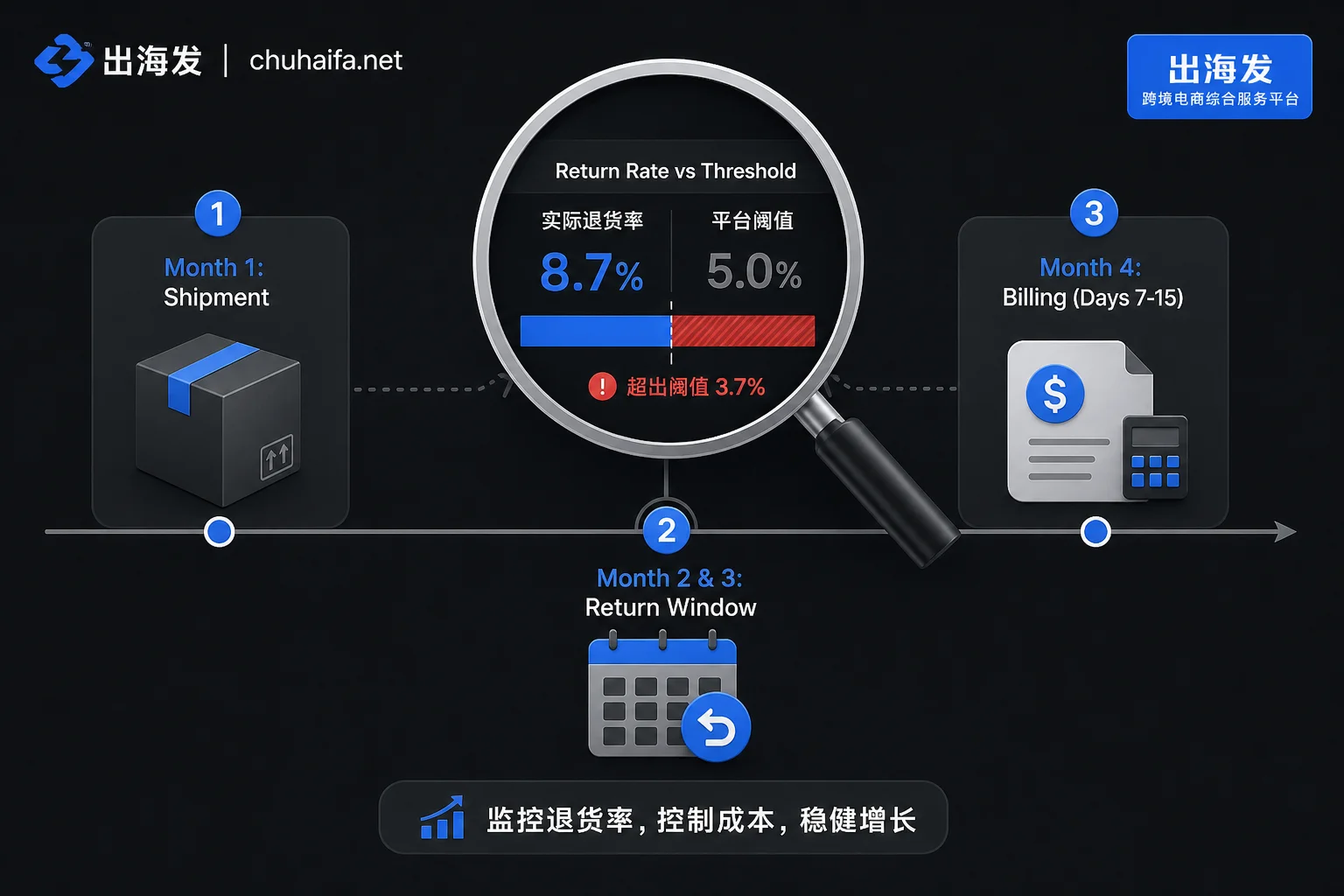
Because the window spans three months, returns from different shipment months are grouped separately. This means the return rate data you see in the backend is often lagging and not directly equivalent to real-time returns. Once calculated, the system compares it to the preset threshold for that product's category. Fees incur only if the return rate exceeds the threshold, and only for the portion of items above the threshold. The per-unit fee is determined by the item's size tier and shipping weight, so larger or heavier items in the same category typically incur higher per-unit fees.
No Charge Within Threshold: Why "Returns" Doesn't Always Mean "Fee"
For sellers in non-apparel and non-footwear categories, a common misconception is that every return incurs an extra fee. In reality, Amazon sets return rate thresholds for most categories to tolerate normal operational loss. Only when a shipment month's return rate exceeds this red line does the excess portion incur charges.
The threshold is set by the platform per category and displayed in Seller Central. Currently, there is no public API for bulk retrieving thresholds by subcategory; sellers can only check the baseline per category in the backend. This mechanism means low-return-rate products won't trigger this fee for long periods. However, if a month sees a spike in returns due to shipping delays or product defects, once the threshold is crossed, the bill suddenly appears. Therefore, daily monitoring should focus on SKUs near the threshold, not all return orders.
Comparison Table: Apparel/Footwear vs. Other Categories Billing Differences
To better determine which rules apply to your products, we need to distinguish two completely different billing logics. Apparel and footwear have a direct "per-item fee" policy due to high industry return rates, while other categories follow the "excess fee" principle.
| Dimension | Non-Apparel/Footwear | Apparel and Footwear |
|---|---|---|
| Return rate threshold? | Yes, must exceed category-specific threshold | No threshold limit |
| Items charged | Only the portion above the threshold | All returned items |
| Fee basis | Based on size tier and shipping weight | 50% of the item's shipping fee |
| Exemptions | Monthly shipments <25 items or first 20 returns for new items | No threshold; whether exemptions apply is per backend fee page, no official uniform rule |
| Where to view | FBA Returns dashboard, Payment transaction report | Same, but note fee basis is shipping fee |
Notably, while apparel and footwear have no threshold, their fee is anchored at 50% of the shipping fee, making small lightweight items relatively manageable, but large apparel items may incur higher fees. Sellers should incorporate this fixed ratio into gross margin projections during product selection.
Monthly Shipment 25 Items Exemption and New Item First 20 Returns: Boundaries of Two Exemptions
Regarding the question "Do I pay return processing fees if I sell less than 25 items a month?", the key is the monthly shipment count of the child ASIN. If a child ASIN's FBA shipments in a calendar month are fewer than 25 units, all items shipped that month are exempt from return processing fees. The key here is that it's determined per child ASIN and per shipment month, not based on store-wide sales or parent ASIN aggregates.
Additionally, eligible parent ASINs enrolled in the "FBA New Selection" program are exempt from fees for the first 20 returned items within 180 days of the first item being received at the fulfillment center. These exemptions provide buffer for product testing. However, sellers should be cautious: if monthly sales just exceed 25 units, or if the 180-day protection period or 20-item quota is exhausted, fees will start accumulating again. Therefore, exemptions should not be seen as a long-term cost avoidance strategy, but as temporary protection during new product launch.
Why Fee Deduction Lags: Bill Alignment with Shipment Month
Financial reconciliation often encounters discrepancies due to when Amazon deducts return processing fees. Since the full three-calendar-month window must be waited out, Amazon deducts fees between the 7th and 15th of the third month after the shipment month. For example, for June shipments, the return window covers June to August, and the final fee charge appears between September 7 and September 15.
This lag requires sellers to think retrospectively when reconciling. When seeing a September charge, don't associate it with September orders but trace back to June shipments. For accounting, it's recommended to attribute this fee back to the original shipment month (June) to reflect true monthly gross margin. If recorded in the deduction month, it will inflate profits in peak months and deflate in off-peak months, distorting business analysis.
Where to Check Threshold, Return Rate, and Fee Details in the Backend
To accurately answer where to check return processing fees in the backend, you need to combine multiple reports. First, the "FBA Returns" dashboard updates three times a week and is the main entry to see ASIN return rates and category benchmarks, useful for initial risk assessment. Second, specific deduction amounts can be found in the "Payments > Transaction View" where each actual cash outflow is recorded.
For more granular operations, use the "SKU Economics" tool to allocate these fees to per-unit margin, evaluating their impact on net profit. Meanwhile, the "FBA Buyer Returns Report" helps track individual return quantities and reasons for anomaly investigation. Since Amazon doesn't offer automation APIs, this data requires manual cross-checking. It's advisable to maintain an internal reconciliation table by shipment month, periodically syncing backend data to ensure consistency.
Scenario-Based Approach: Cost Reservations for Testing, Scaling, and Apparel/Footwear
Different lifecycles and categories require different fee reservation strategies in margin tables.
| Scenario | Applicable Conditions | Reservation Location & Calculation Basis | Backend Reports to Monitor |
|---|---|---|---|
| New product testing | Monthly shipments may be under 25 units, or within new selection program validity | Fee not yet included in per-unit cost, but note the expiration date (180 days or 20 items) | FBA Returns dashboard, New Selection status |
| Scaling (non-apparel) | Stable sales, return rate near but below threshold | Estimate potential excess above threshold and reserve, attributing the reserve to shipment month not deduction month | SKU Economics, Payment transaction report |
| Apparel/footwear | Any sales level, as long as returns occur | Directly include estimated return probability times 50% of shipping fee in margin table | FBA Buyer Returns Report |
| Old product fluctuation | Return rate volatile, hard to predict | Continue excess portion reservation logic per shipment month; after third-month bill, use it to calibrate future pricing, not replace reservation | Payment transaction report, historical return trend chart |
This segmented approach avoids cost misjudgment from a one-size-fits-all method. Especially for apparel/footwear, since every return incurs a fee, directly converting return probability into a fixed cost is more robust. For other categories, the focus should always be on "how much safety cushion remains before the threshold" to decide whether to provision risk reserves.
Frequently Asked Questions
What return rate triggers the fee on Amazon?
There is no universal standard number. Amazon sets specific return rate thresholds per category; the fee applies only when a shipment month's return rate exceeds that category's threshold, and only on the excess portion. Specific thresholds are visible in the backend under the "FBA Returns" dashboard for each ASIN; Amazon doesn't publish complete data publicly.
Are return processing fee and return shipping fee the same?
No. Return processing fee is an additional operational compensation fee for high return rates or specific categories (like apparel), only charged when trigger conditions are met and with delayed settlement. Return shipping fee occurs in the logistics of buyer returns. The trigger points and calculation methods are completely different.
Do apparel and footwear categories have to pay return processing fees?
Yes, but the logic differs. Apparel and footwear have no threshold; every returned item incurs a fee equal to 50% of the shipping fee. Whether exemptions like monthly shipments under 25 items apply is not uniformly defined in official public explanations; backend fee pages should be consulted.
When are return processing fees deducted for peak-season shipments?
Always delayed until the third month after the shipment month. Because data from the shipment month plus the following two months (a total of three calendar months) must be collected, Amazon deducts the fee between the 7th and 15th of the third month. For example, for June shipments, fees are deducted between September 7 and September 15.
Do I pay return processing fees if monthly sales are under 25 items during testing?
No. If a child ASIN's FBA shipments in a calendar month are fewer than 25 units, all items shipped that month are exempt. This is an exemption for small-volume trial sales or long-tail products, calculated per child ASIN, not aggregated across parent ASINs or store-wide.
Finally, we recommend establishing your own fee allocation methodology based on shipment month rather than billing month. First, check the backend Returns dashboard to see your main ASINs' category baseline positions, then decide reservation strategies for testing and scaling phases. This type of navigation site simply categorizes fee explanation pages, category threshold lookup entries, and gross margin calculation tools like how long does cross-border payment take to arrive for easy review; it does not replace backend data.