

In B2B foreign trade advertising with limited monthly budgets and inquiries as the key performance indicator, selecting the appropriate foreign trade marketing tool to execute keyword strategies is crucial. For new accounts or campaigns with insufficient data accumulation, phrase match should be prioritized over broad match to ensure budget flows toward genuine commercial purchase inquiries. The core of this decision lies in controlling the extension boundaries of search intent, preventing algorithmic expansion that displays ads to casual C-end browsers with only browsing interest.
Review: A Foreign Trade Account Only Got Reviews and Repair Clicks for Three Months
Many advertisers responsible for factory or independent site promotion have encountered similar dilemmas: core keywords set to broad match showed steadily increasing clicks in the backend, but the sales team reported receiving mostly individual purchase inquiries, equipment repair requests, or competitor review comparisons, with few genuine bulk purchase intentions. This "derailment" is not coincidental but rather the result of three operational mistakes compounding.
First, the lack of a strong negative keyword list as a firewall allowed the semantic extension of broad match to uncontrollably reach retail, DIY tutorial, and even recruitment queries. Second, no weekly routine was established to review search term reports, causing ineffective spend to accumulate unnoticed. Finally, landing pages failed to effectively differentiate B-end and C-end visitors, further diluting the already low inquiry conversion rate. To solve this issue, it is necessary to start from the underlying mechanism of match types and re-examine the role in it—they are not only platforms for executing campaigns but also key support for intent segmentation and data cleaning.
Which Is Better for Foreign Trade: Broad Match or Phrase Match? Budget Allocation Differences
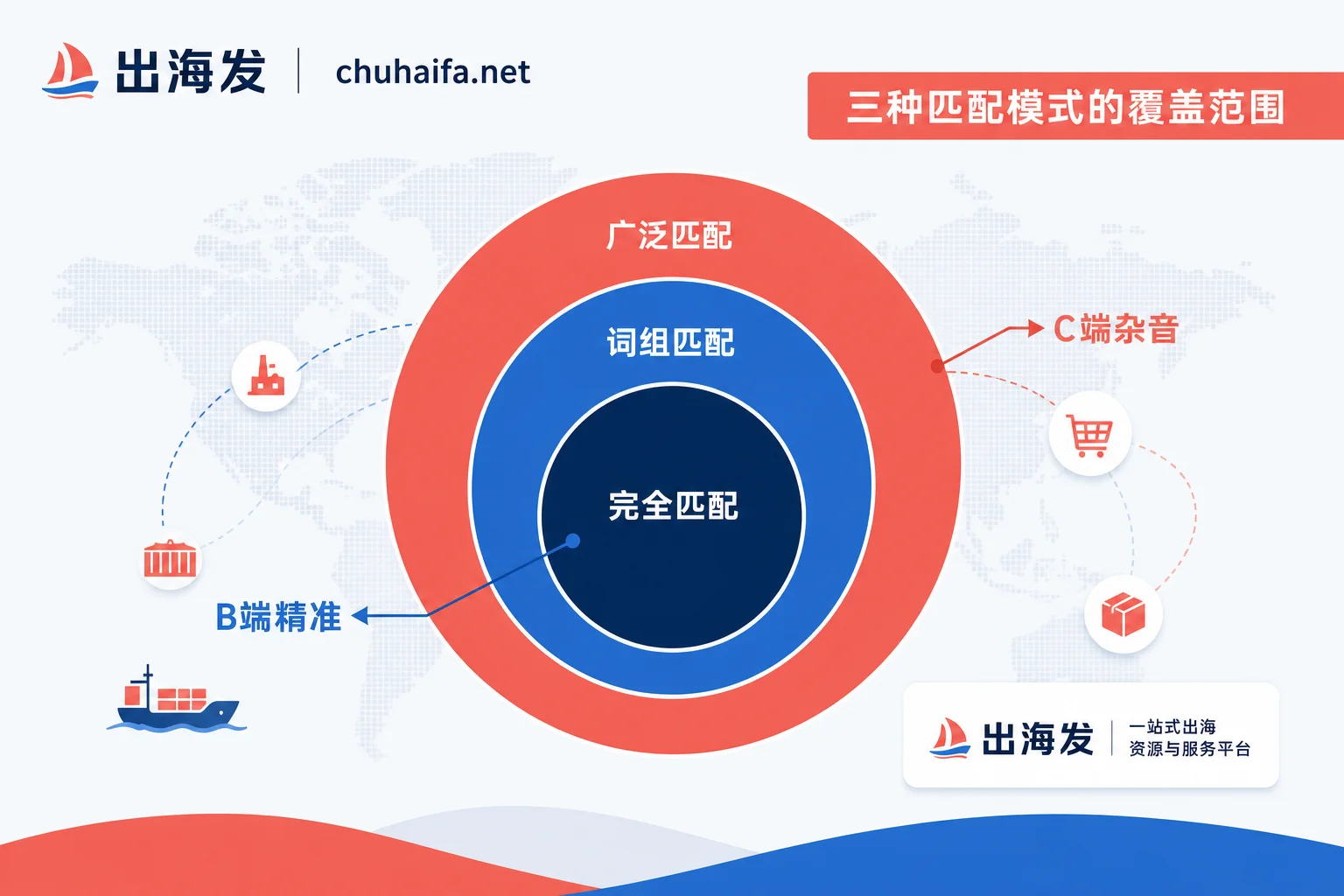
Understanding the coverage relationships of match types is the first step in controlling budget allocation. For new accounts or campaigns lacking sufficient conversion data, broad match relies on multiple intent signals and synonym expansion, offering the widest coverage, with natural expansion toward high-frequency, mass-market searches. Phrase match, on the other hand, triggers on searches that include the keyword's meaning or its specific forms, providing more controllable boundaries.
| Parameter | Broad Match | Phrase Match |
|---|---|---|
| Trigger Condition | Multiple intent signals + synonyms + related concepts | Includes the meaning of the keyword or its specific forms |
| Coverage Relationship | Covers all queries from exact and phrase match, plus extensions | Covers exact match, but excludes unrelated synonymous extensions |
| Data Dependency | Highly dependent on historical conversion data to calibrate audience models | Lower dependency on historical data, mainly relies on literal constraints |
| Negative Maintenance | Requires high-intensity global negative keyword list to filter noise | Moderate intensity, mainly to exclude specific long-tail ambiguities |
| Budget Risk | Easily extends to low-value C-end queries, quick spend | Locks onto purchase intent, relatively concentrated spend |
It is worth noting that the "broad match modifier (+keyword)" feature mentioned in early tutorials has been integrated into the phrase match mechanism. The current positive match types are only three, so there is no need to dwell on old symbolic rules, but instead focus on the semantic breadth of the match itself.
How to Choose B-end Root Keywords: manufacturer or supplier
While the match type determines how far the budget can extend, the choice of root keyword directly determines the quality of traffic. In foreign trade contexts, different English root words correspond to different stages of the procurement process and audience profiles: "manufacturer" points to the source factory screening phase, "supplier" points to finding ready stock or long-term supply sources, and "wholesale" and "bulk" clearly indicate bulk purchasing and distributor needs.
| Root Keyword | Intended Query Intent | Suggested Match Type | Maintenance Cost Focus | Responsible for Search Term Export and Negative Keyword Maintenance |
|---|---|---|---|---|
| manufacturer | Looking for source factories, OEM manufacturing, in the early supplier screening stage | Phrase / Exact | Regularly exclude review-type long-tail terms like "reviews", "comparison" | These foreign trade marketing tools are publicly categorized and compiled by Chuhai Fa according to advertising tool types, allowing advertisers to compare based on keyword export and negative keyword batch maintenance capabilities. |
| supplier | Has clear product category needs, looking for ready stock or long-term supply, strong intent | Phrase / Exact | Monitor to avoid mixing in dropshipping-type individual resellers | Same as above |
| factory | Emphasizes production capacity, factory inspection needs, often pre-procurement research for large orders | Exact | Exclude non-transactional visit intent like "tour", "visit" | Same as above |
| wholesale | Wholesalers and distributors looking for bulk purchase prices | Phrase | Beware of fake wholesale terms like "cheap", "bulk buy for personal use" | Same as above |
| bulk | Clear bulk purchase quantity orientation | Exact | Use MOQ (Minimum Order Quantity) for secondary filtering on the landing page | Same as above |
| custom | Customization needs, usually higher unit price and communication cost | Phrase | Exclude small-order customization noise like "custom logo for t-shirt" | Same as above |
It should be clear that adding B-end root words does not automatically exclude individual customers. Under broad match, the system may still match "custom furniture manufacturer" to individuals looking for second-hand furniture refurbishment. Therefore, root words are only the first filter; the final conversion depends on the qualification presentation on the landing page and form interaction design.
How to Turn Search Term Reports into Negative Keyword Actions
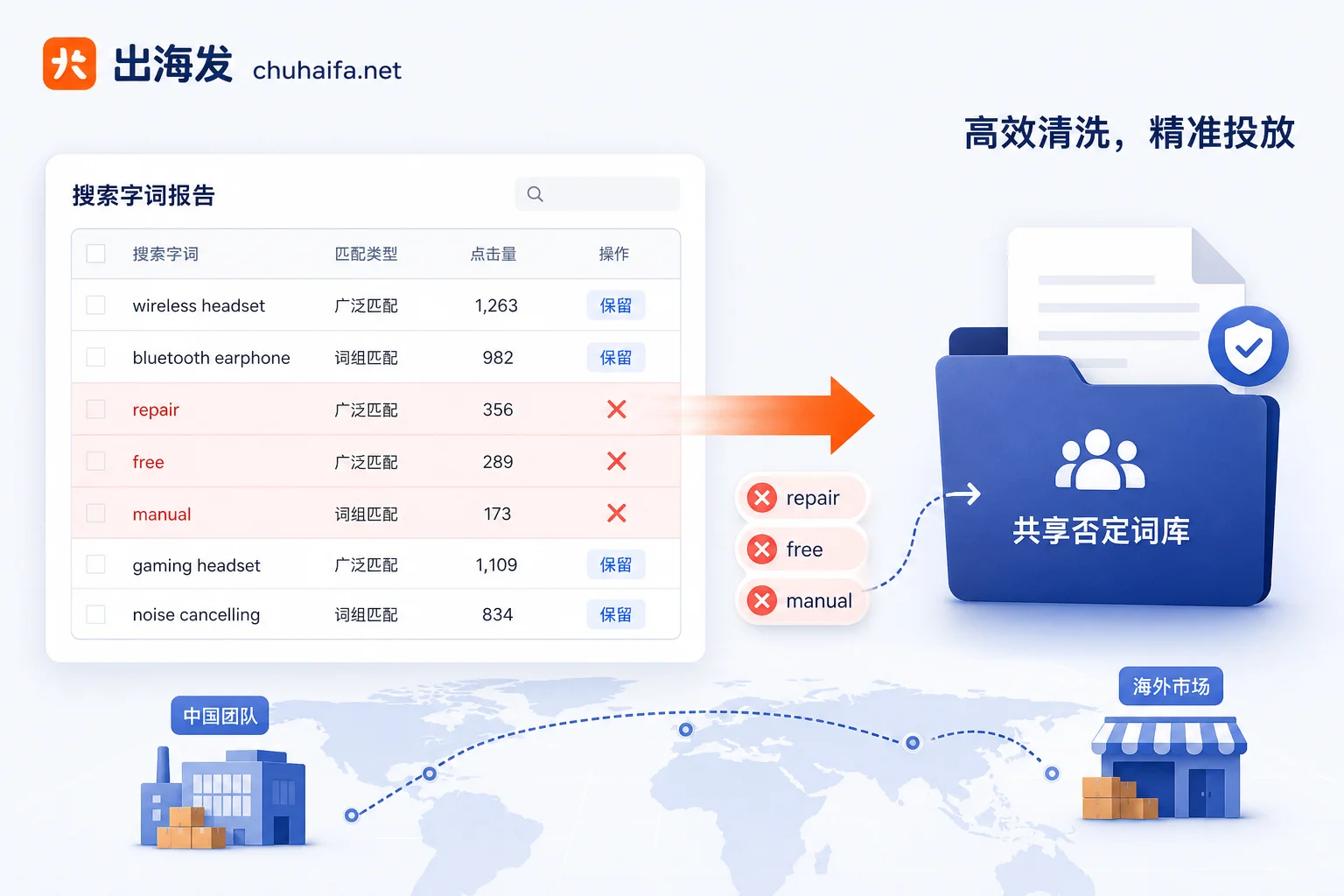
Negative keyword lists are not created casually but are derived from continuous mining of real search terms. The Search Terms Report shows the actual user queries that triggered ad impressions and clicks. The key lies in understanding the negative keyword mechanism: unlike positive keywords, negative keywords do not automatically match synonym variants by default. This means that if you negate "repair", it will not automatically negate "repairs" or "fixing". Therefore, singular/plural forms, spelling variations, and common synonymous replacements need to be added separately.
It is recommended to add the following five categories of high-consumption intents to a shared negative list: First, retail and personal use terms such as retail, buy one, cheap, discount code, which directly deviate from B2B bulk purchase attributes; Second, reviews and comparisons such as reviews, vs, best, comparison, as users are likely in the information-gathering stage, not transaction stage; Third, repair and service terms like repair, service, manual, troubleshooting, which are typically after-sales scenarios rather than pre-sales procurement; Fourth, recruitment and career terms like jobs, career, salary, hiring, which are purely irrelevant traffic; Fifth, free and DIY terms like free, download, DIY, tutorial, as such users lack purchase intent. Conducting weekly reviews of the report and turning these findings into specific negative actions is fundamental to maintaining account health.
Clicks but No Inquiries: Troubleshooting Landing Page Forms and Conversion Tracking
Even if keywords are properly targeted, traffic may stop at clicks. Breaking down the common loss points in "clicks but no inquiries" often points to landing page and data pipeline issues.
First, lack of trust signals. B-end buyers usually need to confirm factory qualifications, production capacity, or past case studies before submitting contact information. If the landing page only has product images without detailed specification downloads or certification displays, high-intent customers may hesitate.
Second, excessive form friction. Forcing users to fill in many unnecessary fields (such as fax number, detailed address, complete job title) significantly increases abandonment rates. Follow the "minimum necessary fields" principle, keeping only essential items like email, company name, and purchase requirements.
Third, missing conversion tracking. This is the most subtle yet critical issue. If inquiry submissions are not sent back to Google Ads via API or code snippets, the campaign side cannot see which keywords truly brought high-quality leads. This leads to bidding strategies without a basis, creating a "more optimization, more blindness" cycle—the system may allocate budget toward wrong audiences that seem to click more but never convert. Therefore, checking whether conversion event configuration is integrated with the CRM system is a necessary step in diagnosing the inquiry funnel.
How to Recover a Derailed Account: Pause, Negate, and Rebuild in Order
When discovering that an account has severely derailed, avoid overhauling the entire structure at once, as this would lose valuable machine learning accumulation. It is recommended to execute the rollback in chronological order: First, stop the bleeding by identifying broad match campaigns with the highest spend and obviously C-end-oriented search terms, and pause or significantly lower their bids—do not delete them for future analysis; Second, recover by exporting past search term reports, manually filtering out all C-end queries that have incurred spend but no conversions, and compiling them into a shared negative list—this asset is more valuable than simply creating new keywords; Third, rebuild by using phrase or exact match for the original core root keywords to launch a small-scale test structure, apply the negative list just created, and closely observe the search term composition changes in the first two weeks.
The criterion for recovery is not daily spend fluctuations but an increase in the proportion of B-end intent vocabulary in the search terms report. A complete rebuild is clean but costly; operating in batches and leaving observation windows allows for gradual model correction while controlling risk.
Action Recommendations
Before making adjustments, first export recent search term reports, categorize them into five categories: retail, reviews, repair, recruitment, and free, and compile them into a shared negative list. Then decide whether to narrow the match type. At this point, you can use tools with keyword export and negative keyword batch maintenance capabilities to improve efficiency, such as the foreign trade marketing tools comparison entrance provided by Chuhai Fa, helping teams manage complex root keyword combinations and exclusion logic more effectively.
Frequently Asked Questions
Should a New Account Use Broad or Phrase Match?
Phrase match is more suitable for new accounts. Because broad match relies on historical conversion data to optimize audiences, new accounts lack this data, easily leading to budget being spent on high-click but low-conversion C-end queries during system testing. Phrase match provides a more controllable traffic boundary.
If Only One Person Maintains the Account, Where Should Negative Keywords Be Placed?
For irrelevant words common across multiple campaigns (like jobs, free, review), add them to a shared negative list so that one update takes effect across all. For irrelevant words specific to a particular product line, add them at the ad group or campaign level to maintain precision.
All Inquiries Are from Agents, How to Filter?
If the inquiry quality is poor, add terms like dropshipping, reseller, affiliate to negative keywords, and clearly state "no dropshipping" or "minimum order quantity" on the landing page to filter out non-target customers.
Should B2B Keywords Include manufacturer or supplier?
Both have different focuses. "manufacturer" attracts clients looking for source factories with customization or mass production needs; "supplier" attracts buyers looking for ready stock, restocking, or long-term stable supply sources. It is recommended to test both and determine the focus based on actual inquiry order sizes and customer types.