

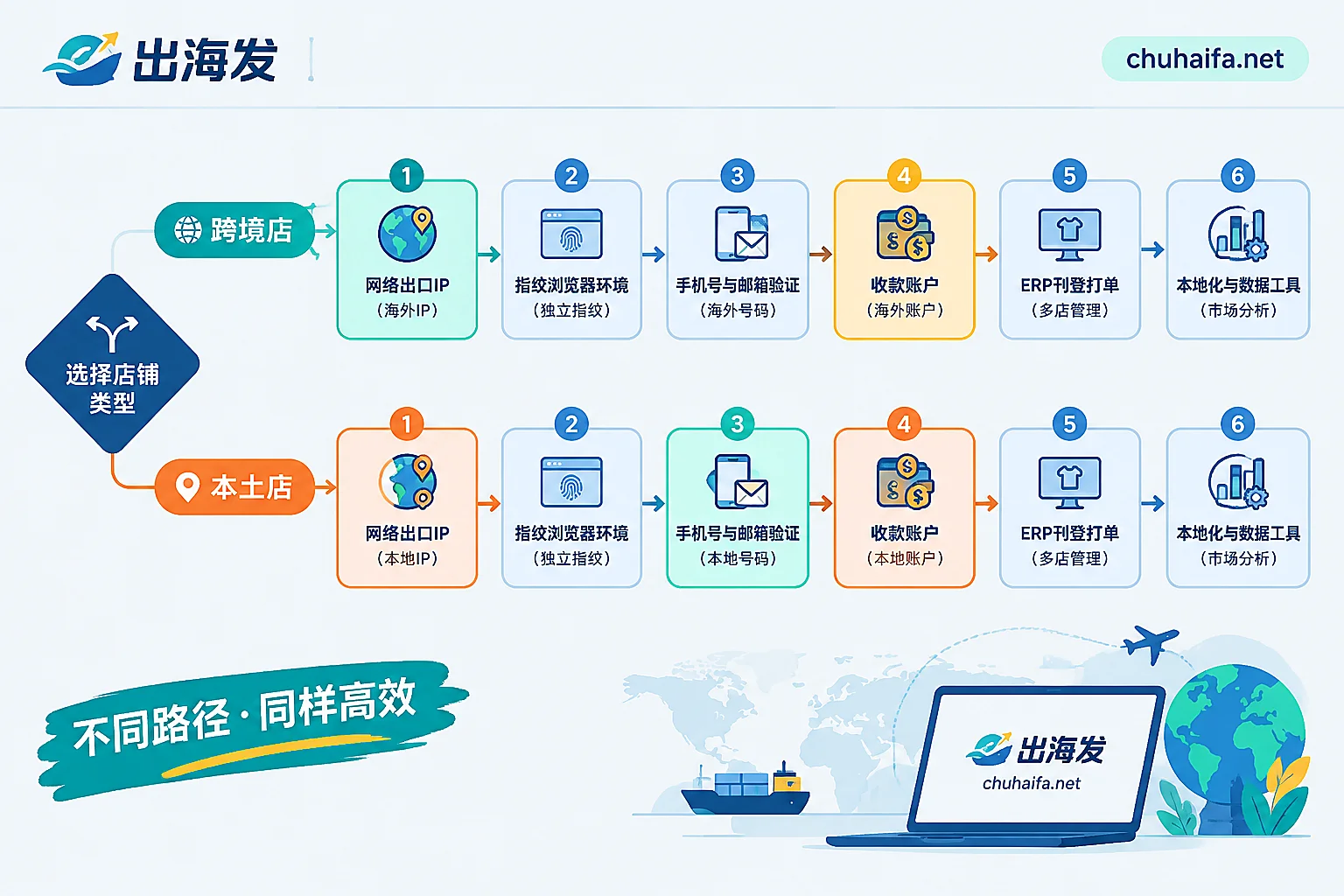
Let's get straight to the point: what you really need to prepare in advance for Southeast Asian sites falls into six categories—a clean and controllable network exit, a fingerprint browser that can isolate multiple stores, phone numbers and email addresses not previously bound to the TikTok ecosystem, accounts that can receive payments, an ERP that supports your target sites, and tools for minor language content and product selection data. The first four determine whether you can get started and whether you can get your money back, while the last two determine how fast you can run once you're up.
But before purchasing anything, there's one thing you must decide first, otherwise at least three items on the checklist will be bought incorrectly.
Step 0: First confirm whether you're opening a cross-border store or a local store
There's more than one entry channel for Southeast Asian sites. Cross-border stores registered with Chinese entity qualifications and local stores opened with local qualifications (business license, local identity/legal person information) have completely different tool requirements in three areas:
- IP location: Cross-border stores have relatively greater tolerance for login locations, while local stores' login environments not matching the declared qualifications is a fairly common trigger for review;
- Verification number: Local stores typically require a local phone number from the target country to complete registration and subsequent security verification;
- Payment path: Cross-border stores use third-party cross-border payment services that support multiple Southeast Asian currencies, while local stores often settle to local personal/business bank accounts or local wallets.
So the checklist is not a one-size-fits-all configuration. First go to TikTok Shop's official onboarding guide to confirm which channel is currently open for the site you want to open and what materials are required—the platform's onboarding policies and site availability will be adjusted, and official announcements take precedence over any third-party tutorials (including this one). Once this step is done, each item below will have clear parameters.
Category 1: Network Exit (Must Be in Place Before Registration)
The network environment in which the registration page is opened must be fixed from the very first time. Switching exits midway, or jumping back and forth between a data center IP today and a residential IP tomorrow, is handing materials to risk control yourself.
When choosing, look at these points:
- Location: For local stores, choose according to the target country (Thailand, Malaysia, Vietnam, Philippines, etc.). For cross-border stores, at least ensure the exit is stable and not a shared pool that has been repeatedly abused;
- Dedicated or shared: For long-term assets like store accounts, try to use dedicated exits and avoid sharing an exit with strangers;
- Static or dynamic: Logging into the store backend requires a long-term unchanging exit IP. Dynamic rotating pools are suitable for scraping tasks, not for holding stores;
- Type: Residential IPs are generally better than pure data center IPs at appearing "human-like" to the platform, but data center VPSs win in stability and controllability. When local stores are sensitive to location, residential types are more reliable;
- Whether it drifts: Some lines claim to be static but actually change segments every few days. Before opening a store, observe continuously for several days whether the exit IP remains constant.
For a more detailed breakdown of how to distinguish IPs and protocols by task type, refer to this article: How to Choose Overseas Proxy IPs? Match IP Types and Protocols by Task.
Category 2: Fingerprint Browser (Determines Whether You Can Open a Second Store)
If you're only opening one store with one dedicated computer, theoretically you can do without it. But if any of the following situations arise, a fingerprint browser is essentially a necessity: multiple sites, multiple stores, multi-person collaboration, or the same computer also logged into other TikTok accounts.
It solves identity overlap at the browser level: if parameters like Canvas, Audio, WebRTC, User-Agent, fonts, time zone, language, and cookies are completely identical between two stores, simply changing IPs won't prevent association.
Key points when choosing:
- Whether it supports binding a proxy to a single environment, rather than routing everything through the same line globally;
- Whether fingerprint parameters are consistent with the IP. Time zone, language, and geolocation should match your exit country. A Thai IP paired with Simplified Chinese + UTC+8 time zone is creating contradictions yourself;
- Team permissions and environment transfer. When an operator leaves or accounts are handed over, can you transfer just a specific environment without giving out account passwords?
- Environment sync and backup. If local cache is lost, can the login state be restored?
In terms of order, buy and test the IP first, then configure the environment. One environment corresponds to one exit, and do not switch midway during the entire registration process.
Category 3: Phone Numbers and Email Addresses (The Item Most Likely to Cause Problems Six Months Later)
What you need for registration is a phone number and email address not previously bound to other TikTok ecosystem accounts. This sounds simple, but many people actually stumble on "the number later becomes unusable."
Distinguish two uses:
- One-time registration verification: Receiving a single SMS is enough. Using temporary numbers from SMS receiving platforms has the lowest cost;
- Long-term binding and secondary verification: Subsequent security verifications, rebinding, withdrawal risk control, and remote login confirmations for the store will all send SMS to this number. If you used a temporary number that was released a few minutes after registration, you won't be able to get it back when verification is needed.
It is recommended to prepare the number bound to the store as a long-term holding: a physical SIM card (especially when local stores require a local number), or a number segment from an SMS receiving platform that can be rented long-term, exclusively, and receive repeatedly. The same goes for email—one email per store, and using a domain email you can control long-term is more worry-free than a free email.
For more specific guidance on the two criteria for number type and usage period, see this article: How to Choose an Overseas SMS Receiving Platform: Two Criteria for Number Type and Usage Period.
Category 4: Payment Accounts (Confirm as Early as Possible)
This item is often placed last, but it is the most likely to hold you up: the store is open, orders are coming in, but you can't prepare a qualifying payment account and can't withdraw the money.
- Cross-border stores: Bind a third-party cross-border payment service that supports multiple Southeast Asian currencies (LianLian Global, PingPong, WorldFirst, etc. are common choices). Pay attention to whether it supports the site you opened, whether it supports settlement in the original currency, and how the foreign exchange settlement path and fees are calculated;
- Local stores: You need to prepare a local bank account or locally compliant wallet in the corresponding country. This is usually tied to which set of qualifications you use to open the store. Whether it can be obtained should be clarified before opening the store.
When choosing a service provider, at least verify the licensing status and funding channels, and don't just compare rates: How to Verify Compliance of Overseas Payment Tools? 4 Steps to Check Qualifications and Channels. When arrival times are abnormal, to determine where it's stuck, you can refer to How Long is Normal for Cross-border Receipts.
Category 5: ERP and Listing/Order Printing (Truly Needed Only After Orders Start)
For the first few dozen orders, manual operations in the backend are completely feasible. Don't pay for scale that hasn't happened yet right from the start. But as soon as you meet "two or more sites" or "over a hundred SKUs," manual listing starts eating up all your time.
ERPs (Miaoshou, Dianxiaomi, BigSeller, etc.) mainly take over four things:
- Product sourcing and bulk listing: Collect products from supply platforms, batch generate listings, and copy across multiple sites;
- Bulk SKU and price changes: Multiple Southeast Asian sites each calculate their own currency and logistics costs. Changing each one in the backend is a disaster;
- Orders and order printing/shipping: Connect to transit warehouses/overseas warehouses, and batch print shipping labels;
- Inventory sync: Prevent overselling when multiple stores share one inventory pool.
Before choosing, confirm two things: whether it officially integrates with TikTok Shop via API, and whether it supports the specific sites you want to open—supporting Malaysia doesn't mean supporting Vietnam. Also, authorizing an ERP means handing over some store permissions. The scope of permissions and data security terms are worth a look.
Category 6: Localized Content and Product Selection Data
A large part of the conversion barrier in Southeast Asia is language. Product titles, descriptions, short video scripts, and voiceovers in Thai, Indonesian, and Vietnamese can be machine-translated but easily go wrong on category terms, size descriptions, and efficacy claims. A viable approach: use AI tools for bulk initial translation and script generation, and have key positions (title keywords, compliance-related expressions) reviewed by local influencers or native speakers.
On the product selection side, third-party data tools like FastMoss and KaloData plus the official opportunity center are used to view category bestseller lists, viral video structures, and influencer sales performance across sites. After selecting, remember to do an infringement check, especially for sourced products. The four-step pre-listing checklist is here: How to Check for Infringement with Cross-border Product Selection Tools? 4-Step Pre-listing Checklist.
For a new store to generate its first sales from scratch, the rhythm of content scheduling and influencer collaboration can refer to: Overseas Social Media Operations for Southeast Asian New Store Cold Start.
Places Where Wrong Order Causes Rework
- Register first, configure environment later: Registering with your daily computer and then migrating to a fingerprint browser is equivalent to leaving the cleanest record in the wrong environment;
- Registration number used and discarded: You can't receive SMS for later security verification, and the rebinding process is more troublesome than reopening a store;
- Payment account left to the end: Local stores are especially prone to getting stuck at this step. Qualifications and accounts should be planned together;
- Buying full annual packages from the start: ERPs and data tools can wait until order patterns stabilize. Start with monthly payments for trials;
- Multiple stores sharing one IP or one environment: The cost saved is disproportionate to the risk of store suspension.
Where to Go Next to Choose
After matching the six categories above, you can look at specific options by category:
- Underlying network like dedicated static IPs and target country VPS: Overseas Network
- Anti-association tools for multi-store isolation: Fingerprint Browser
- Numbers for registration verification and long-term binding: Overseas SMS Receiving
- Store operations like ERP, listing/order printing, and product selection data: Cross-border E-commerce
If you want to save the trouble of debugging across suppliers and solve IP, browser environment, and numbers with one provider, the NexIP, NexBrowser, and NexSMS included in Overseas Recommendations are such same-source combinations. For specific parameters and covered countries, refer to each company's official website.
One final reminder: platform-side onboarding requirements, site availability, and verification rules will change. Before opening a store, refer to TikTok Shop's official onboarding guide. Tools are only meant to work with the rules, not to bypass them for you.