

When choosing overseas proxy IPs, don't look at the list of providers first. Instead, answer one question: Is this IP for a long-term logged-in account or for thousands of one-time requests? These two scenarios require completely different types of IPs. Mixing them is the starting point of most account bans and scraping failures.
One-Minute Version: Four IP Types for Four Tasks
- Static Residential Proxies (ISP Proxies) — For scenarios where accounts need to stay online long-term and the IP absolutely cannot drift: cross-border e-commerce stores, social media main accounts, ad accounts. One account gets one fixed IP.
- Dynamic Residential Proxies — For scenarios with high request volumes, where the more often the IP changes the better, and getting a single IP banned is acceptable: anti-ban scraping, market price comparison, batch registrations. Usually billed by traffic (GB).
- Datacenter Proxies — For scenarios where the target site has weak defenses and you just need speed and low cost: public data scraping, SEO rank monitoring, page availability checks. High bandwidth, low latency, billed by IP count or unmetered.
- Mobile Proxies — The egress is a cellular network; behind the same egress there are often many real mobile users, so platforms tolerate them more. However, they are expensive, and speed and stability fluctuate greatly. They are generally considered only when residential solutions are clearly blocked, not as a default option.
Below, we explain the rationale behind this classification and when it doesn't apply.
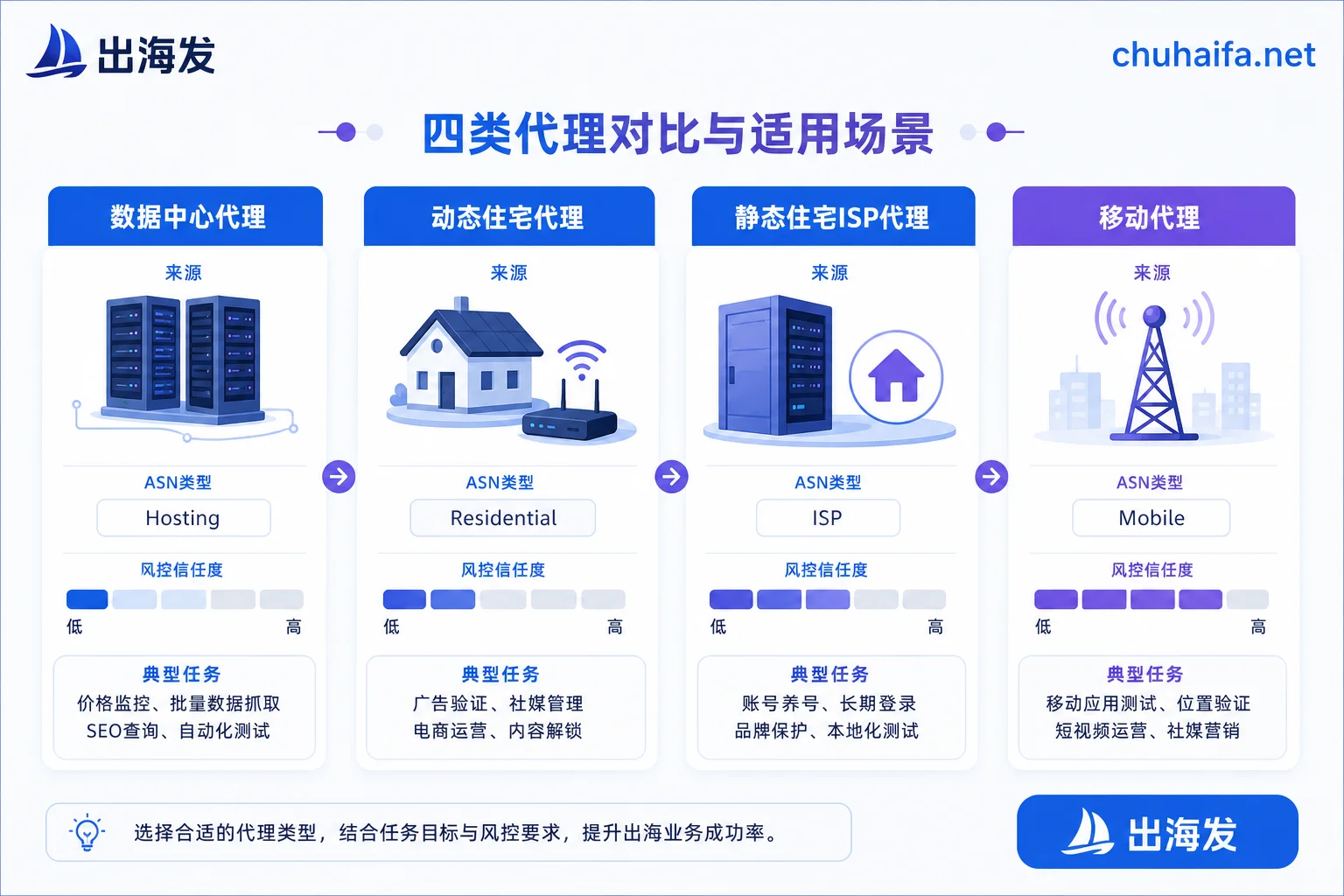
The "Background" of an IP Determines How It Appears to Risk Control
Target platforms judge whether an IP is suspicious largely not by mystique, but by looking up the autonomous system (ASN) to which the IP belongs and seeing how it's tagged in IP databases.
Datacenter IPs belong to data centers, cloud providers, or hosting services, and the ASN type directly says Hosting / Commercial. The target's security gateway can see at a glance that this is not a home user. It works fine on low-defense sites, but on mainstream e-commerce platforms and protected social media, the block rate is high—not because it's "low quality," but because its identity label is inherently visible.
Residential IPs are addresses that ISPs assign to real home broadband connections. In risk control systems, they appear as ordinary home users, with low fraud scores and high trust. Dynamic residential proxies typically support rotation for each request or maintain a sticky session of 10 to 30 minutes. This feature is an advantage for scraping but a disadvantage for account operations: home devices go online and offline, links may drop, and your store backend might disconnect during login, or the next login comes from an IP in a different city—the platform sees an anomaly of geographically discontinuous logins. Therefore, dynamic residential is not suitable for maintaining long-term logged-in main accounts.
Static residential (ISP) proxies emerged to resolve this contradiction: the IP is registered under a residential broadband provider, with the ASN showing ISP/Residential, but the machine is deployed in a data center. The result is both the low-risk label of a residential IP and the fixed IP and high uptime of a data center. Cross-border e-commerce multi-store and long-term maintenance of social media main accounts commonly use this approach.
HTTP/HTTPS vs. SOCKS5: When SOCKS5 Is a Must
Protocol choice isn't about "newer is better"; it's about division of labor.
HTTP/HTTPS proxies work at the application layer (OSI Layer 7). They can read and process HTTP headers, making them sufficient for regular web browsing and ordinary crawlers, and they are the simplest to configure.
SOCKS5 works at the session layer (Layer 5). It transparently forwards raw TCP packets (some implementations support UDP) and does not modify application-layer content. Because it doesn't care about the protocol, it is more versatile—fingerprint browser proxy configurations, multi-account operation software, and non-HTTP automation tools generally prefer SOCKS5. If your workflow involves any of these three, confirm directly with the provider whether they offer SOCKS5 ports before you get halfway through configuration and find out they only provide HTTP.
A practical impact: some providers open both HTTP and SOCKS5 for the same IP pool, while others offer only one or charge extra for SOCKS5. This is a condition to clarify before ordering, not a detail to be discussed after purchase.
Setup for Four Common Tasks
Cross-border e-commerce multi-store. Each store gets one static residential IP. The country/region of the IP should match the store's registration and collection location, and it must not change long-term. From registration day, this IP serves only that one account; don't "borrow" it for other accounts midway.
Overseas social media matrix. Main accounts follow the store's specification: one account, one static IP. Bulk-registered minor accounts can use dynamic residential, but accept that their survival rate is inherently low. If your pipeline includes many new account registrations, coordinate phone number resources and IPs in tandem; the choice of SMS reception services also affects success rates—see How to Choose Overseas SMS Reception Platforms: Two Judgment Lines for Number Types and Usage Duration. Content scheduling and account division within the matrix is another thread—see Overseas Social Media Operations for New Southeast Asian Stores.
Scraping and price comparison. First, test the target site with a datacenter proxy. If it works, there's no need to spend on residential proxies. If you encounter mass 403 errors, CAPTCHA walls, or empty data, switch to dynamic residential and increase rotation frequency. Per-traffic billing means your cost is directly tied to the page size you scrape; fetching images vs. text creates vastly different bills, so estimate volume before starting.
Ad verification and landing page checks. You need to see "what a regular user from a specific country sees." IP purity requirements are moderate, but geographic accuracy is high. When choosing a provider, focus on whether city-level geolocation is reliable, not on the total IP pool size.
Proxies Solve Only Half the Problem
This is the easiest trap to fall into: after switching to a clean residential IP, accounts still get flagged.
The reason is that platform judgments never rely on IP alone. WebRTC leaks revealing your real address, the egress used by DNS requests, whether your system timezone matches the IP's timezone, browser language, Canvas/WebGL fingerprints—all these are considered together in a comprehensive judgment. If you use a US IP but your timezone is Asia/Shanghai and WebRTC leaks your local address, risk control sees an environment that is clearly masked, which is more suspicious than using your local IP directly.
Therefore, the correct form for multi-account scenarios is: Each account = an independent fingerprint browser environment + a fixed static proxy IP, one-to-one bound, unchanged long-term. The fingerprint browser isolates browser-level features; the proxy handles network-level identity. If one is missing, the other is useless.
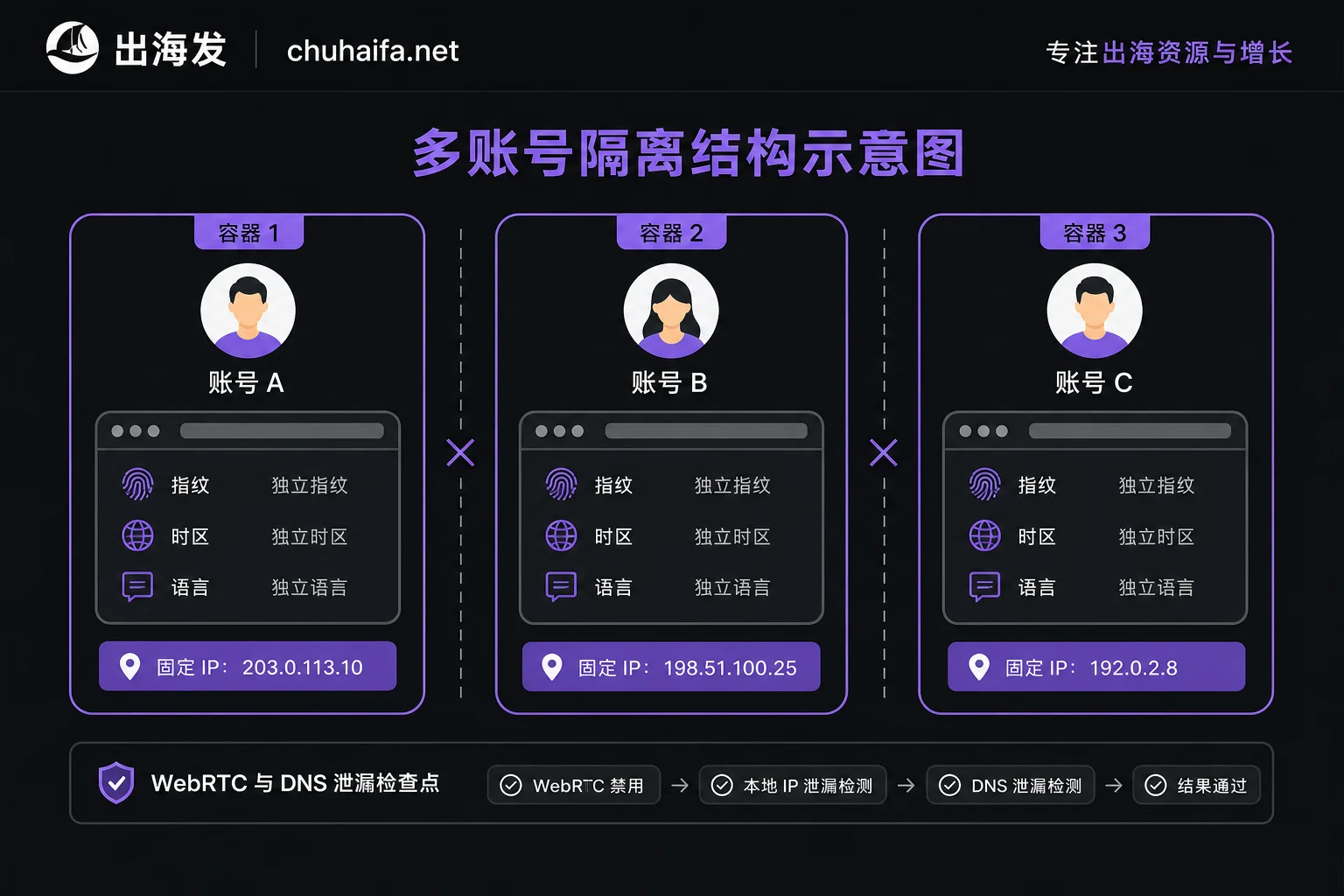
Why a "Clean IP" Can Still Get Banned
Risk control scoring actually has two sets. Proxy Score only measures whether the connection passes through an intermediary—data centers, VPNs, residential proxy networks are all identified. Fraud Score combines the IP's historical blacklist records, abuse behavior, device fingerprint consistency, and your actual operational behavior.
This means two things:
First, a residential IP is not "invisibility"; it reduces the probability of being flagged as a suspicious source, not making you disappear.
Second, even if the IP is clean, registering too fast, highly similar operational rhythms across multiple accounts, or repeatedly switching identities in the same device environment will push up the fraud score. Changing IPs won't fix behavior-level issues. When you face a ban, first determine which layer caused it; otherwise, you'll keep switching providers without solving the problem.
A Few Things Worth Checking Before Ordering (Take Ten Minutes)
- Is the IP type truthful? After receiving a test IP, check its ASN type. A "residential proxy" labeled as Hosting is not residential.
- Protocol support. Does it offer SOCKS5? Is it extra?
- Billing method matches your usage. Per-traffic dynamic residential suits short-term high concurrency; monthly leased static plans suit long-term operation. If used incorrectly, costs can differ severalfold.
- Definition of "dedicated" static IP. Does it mean only you can use it, or only you in the same time period? Ask precisely; it directly affects the IP's historical cleanliness.
- Sticky session duration and geolocation granularity meet your task requirements; don't just look at marketing numbers for IP pool size.
- Trial conditions. Can you do a small paid test? What are the refund rules?
Adjustments Based on Your Actual Situation
Sensitivity thresholds vary greatly across platforms: some barely react to IP changes, others trigger verification as soon as the login IP changes. The classification above is a general starting point. For your specific target platform, it's best to run one or two non-core accounts first to gain experience before scaling. Budget methods also change conclusions—if your task is short-term, high concurrency, and ends quickly, per-traffic dynamic residential is usually more cost-effective; if you have a dozen long-term accounts, monthly leased static IPs are cheaper overall.
Once you've determined which type of IP you need, you can browse the Overseas Network Categories to pick specific proxy and VPS providers. Tools needed for multi-account isolation are in the Fingerprint Browser Category. Overseas launches are collected by track and linked directly to official websites; specific parameters and prices are subject to the respective official sites. In the "Overseas Recommendations" category, NexIP and NexBrowser correspond to the two segments mentioned above; compare them as needed.