

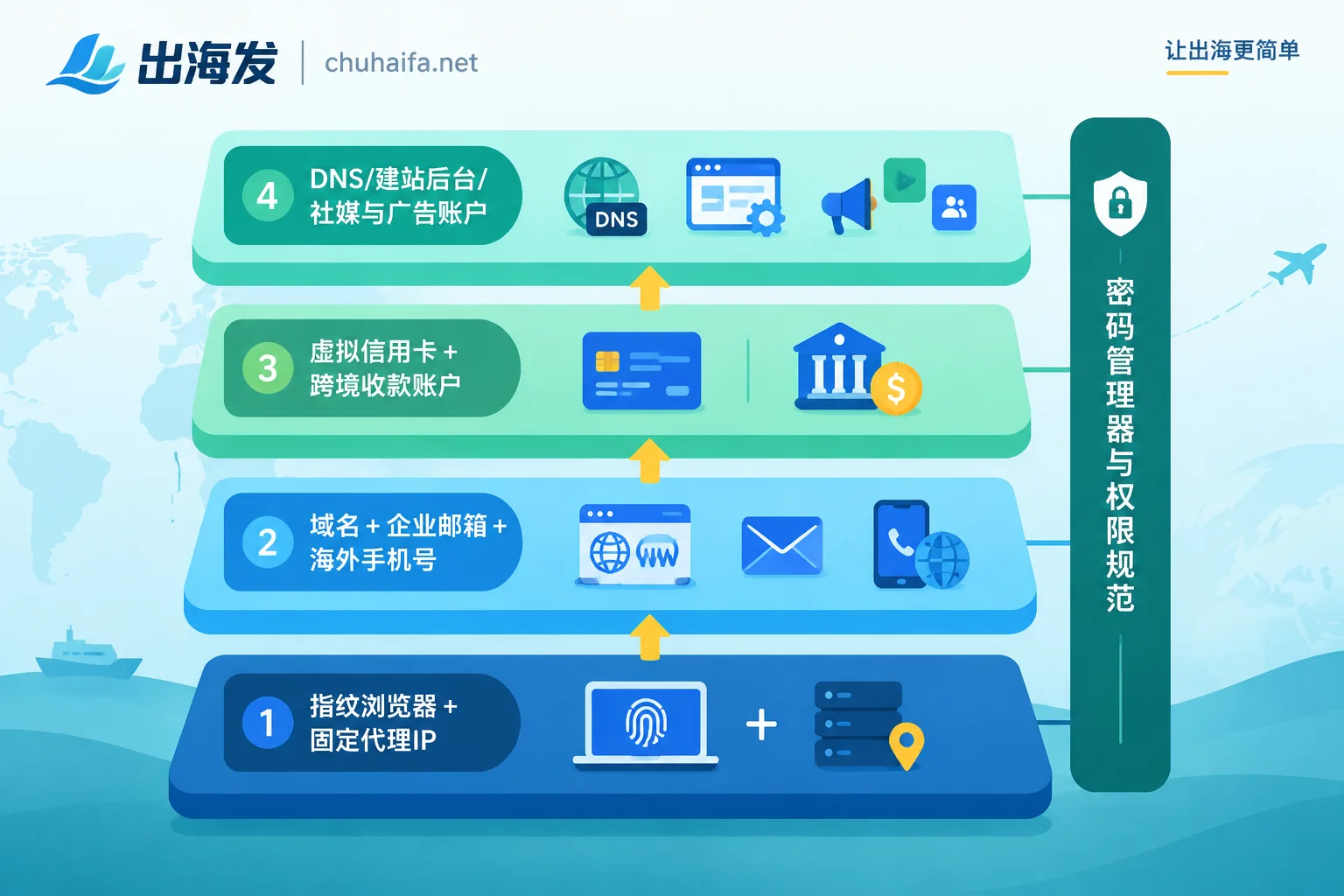
The first week is about laying a solid foundation, not registering business platforms as quickly as possible. Accounts should be opened from the bottom up according to dependencies, in the following order:
- Browser environment and overseas network: Fingerprint browser, plus stable static residential proxies or native IPs.
- Identity and communication credentials: Business domain, domain email, and overseas phone number or SMS verification resources.
- Funding channels: Virtual credit cards (VCC) for paying various subscription fees, and cross-border receiving accounts for collecting money.
- Business and promotion platforms: DNS resolution, website or store backend, social media and advertising accounts.
- Team permissions and password management: Team-level password manager and unified login rules.
This order makes sense: each layer relies on the layer below it. To register an advertising account, you need an email, phone number, and payment method. The email requires a domain first. And from the first login, these accounts will have their device and IP recorded by the platform. If you casually register on an office network and then switch environments later, the account carries inconsistent login records from day one. Build the lower layers first, so every account registered later is born in the same environment—this is more stable.
Layer 1: Fix the browser environment and network first
Platforms like Meta, TikTok, Google, and Shopify all look at the software and hardware fingerprints and IPs of login devices. The registration phase is the most sensitive time for risk control, so this layer comes first.
Fingerprint browsers assign an independent browser environment to each business role or account. The Canvas, WebGL, timezone, and cookies of each environment are isolated from each other, so the platform sees different devices, not the same computer repeatedly switching accounts.
Whether you need a fingerprint browser depends on your situation:
- A company operating a single set of official accounts with the same person logging in: The need is not that strong. Giving that person a fixed device and a fixed network can also maintain consistency.
- Multiple people sharing the same accounts, or running multiple stores/account matrices: It's worth setting up in the first week. For collaboration, its main value is that everyone opens the same environment, rather than logging in from the office one day and from home the next.
Can you get by with a free version first? See this article: Is a free fingerprint browser enough for e-commerce multi-accounting.
Proxy IPs should be bound one-to-one with environments. When registering and long-term logging into core accounts, prioritize exclusive static residential proxies or clean native IPs, and try not to change them frequently. Shared datacenter nodes are easily detected during registration. They are not completely useless—for tasks like scraping or testing that don't require account reputation, datacenter IPs are more cost-effective. For how to divide the work between the two, see What tasks are residential and datacenter proxies suitable for.
The standard for completing this layer: every account to be registered already has a fixed "browser environment + IP" combination, recorded in a table.
Layer 2: Domain, business email, and phone number
Using QQ, 163, or temporary email to register for overseas tools and platforms significantly increases the chance of rejection or triggering risk control. In the first week, you can do this:
- Buy a business domain first. Email, website building, and future brand assets all hang on it, so the earlier you settle it, the better.
- Set up overseas business email, such as Google Workspace, Microsoft 365, or Zoho Mail. Open mailboxes by role, e.g., ads@, shop@, admin@, rather than using the founder's personal email for everything. This way, accounts won't follow a person when staff changes.
- Prepare an overseas phone number for receiving registration SMS and verification codes.
Phone numbers should be treated differently by purpose:
- One-time verification: SMS receiving platforms are sufficient.
- Phone numbers bound long-term to core accounts, such as advertising accounts or store backends, may later be used to recover accounts or re-verify. Such numbers should preferably be long-term holdable numbers, not disposable ones.
For two-factor authentication, wherever an authenticator app is supported, prioritize the authenticator app rather than relying solely on SMS.
For how to choose numbers by country and platform, see How to choose numbers from overseas SMS platforms by country and platform.
Layer 3: Open payment and receiving channels separately
Cloud servers, website building platforms, collaboration SaaS, and later advertising top-ups basically all require foreign currency settlement. Domestic ordinary dual-currency cards may fail to settle or be blocked by anti-fraud at overseas merchants, so it's best not to use them as your main card.
In the first week, open two types of things:
- Corporate virtual credit cards (VCC): For paying daily tool subscription fees, preferably supporting multi-currency deductions. You can open multiple cards by purpose, e.g., one for SaaS, one for advertising, for easier bill and quota management.
- Compliant cross-border receiving and payment accounts: Common ones include Airwallex, PingPong, WorldFirst, etc., or you can open an overseas merchant account. It handles receiving sales proceeds, and many platforms' virtual cards are also topped up from such accounts.
Receiving accounts generally require reviewing company entity documents, which takes time. Specific materials and duration vary by provider. It's recommended to submit on Monday, rather than waiting until the store is about to launch.
Choosing which provider mainly depends on two things: where your money comes in from (which platform or channel), and where the company entity is registered. You can refer to How to choose a cross-border receiving platform based on company entity. For how virtual cards and receiving accounts connect into a funding chain, see How to use virtual cards and cross-border receiving accounts together.
Layer 4: Register business and promotion accounts last
By this step, the network, environment, email, phone number, and payment methods are all ready. Each platform is registered in its own fixed environment, using the corresponding role's email and a fixed phone number.
By business line, these typically include:
- Domain DNS resolution: e.g., Cloudflare.
- Website or store backend: e.g., Shopify, or seller backends of various e-commerce platforms.
- Social media and advertising assets: e.g., Meta Business Manager, Google Ads, TikTok for Business, X.
After registering each main account, immediately enable two-factor authentication based on an authenticator app. Don't wait for problems to arise.
Different business models have different priorities at this layer:
- Independent websites: Focus on domain, DNS, website backend, and payment gateway. For details, see What types of tools are needed from website building to receiving payments for independent sites.
- Platform e-commerce (Amazon, TikTok Shop, etc.): Seller backends have their own store opening document requirements, and you need to confirm whether the receiving channel is supported by the platform. For TikTok Shop Southeast Asia, you can refer to this checklist ordered by launch sequence.
- B2B foreign trade inquiries: The professionalism and deliverability of domain email are more important, and advertising accounts can be opened later.
- Software or tool going global: Focus on receiving payments and subscription deductions; the need for fingerprint browsers is relatively smaller.
Layer 5: Passwords and permissions—actually should be opened on day one
When a team collaborates on overseas accounts, this often happens: someone logs in from another location or changes network environment, and the account gets locked. Although team-level password managers (like 1Password, Bitwarden) rank in the last layer, it's recommended to open them on day one, because from the first account onward, all credentials should be stored directly in them, not scattered in chat records.
By the end of the week, clarify the rules:
- Administrators distribute environment configurations and login credentials uniformly; employees get permissions by role.
- Core assets can only be logged into in designated browser environments, not directly on personal devices or unauthorized networks.
- Maintain an account ledger: account, associated environment, bound IP, email, phone number, payment card, who holds the 2FA.
How to schedule the week
- Monday: Open password manager; buy domain; submit cross-border receiving account application; decide which platform accounts to register and list them.
- Tuesday: Open fingerprint browser, purchase proxy IPs, create "environment + IP" combinations for each planned account.
- Wednesday: Configure business email and open mailboxes by role; prepare overseas phone numbers; open virtual cards.
- Thursday: Register DNS, website or store backend in fixed environments; enable 2FA after each registration.
- Friday: Register social media and advertising accounts; send the ledger and login rules to the team. If the receiving account is still under review, use virtual cards to pay subscription fees for now.
If you can't finish within a week, prioritize the first three layers. Registering business accounts two days later has little impact; accounts registered in unstable environments are much more troublesome to deal with later.
Where to pick tools next
Once you've determined which types of tools you need, you can choose from the corresponding categories. Each entry leads directly to the official website; features and prices are subject to the official website:
- Proxy IPs, VPS, domains: Overseas Network
- Multi-environment isolation: Fingerprint Browsers
- Virtual cards and cross-border receiving: Overseas Payments