
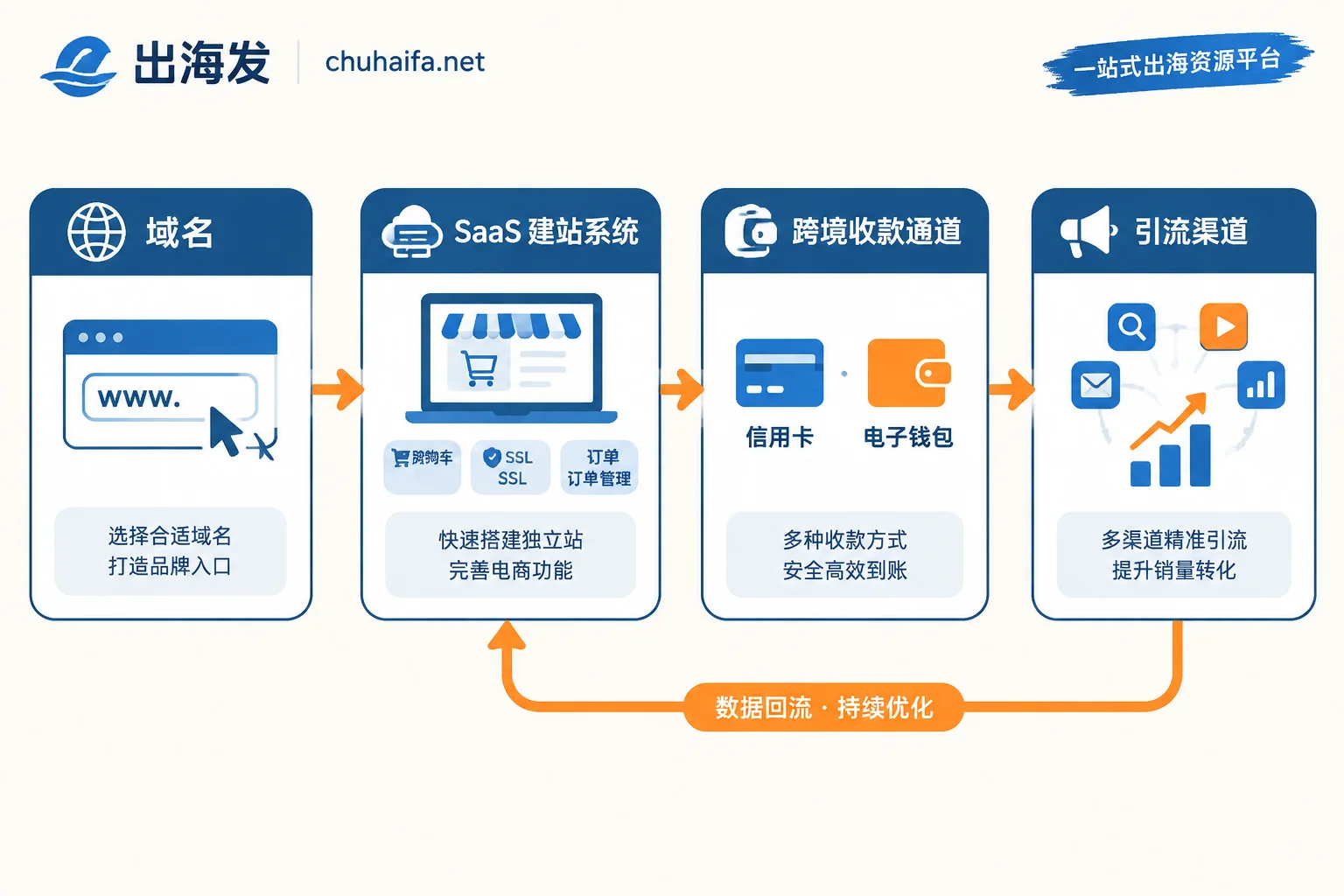
For a solo DTC site, to complete the loop of “someone sees the product → can place an order → money arrives → goods ship,” you need a minimum of 4 categories of tools:
- A custom domain
- An all-in-one SaaS site builder
- A cross-border payment channel (international credit card acquiring + an e-wallet)
- One traffic acquisition tool for the launch phase
If you do dropshipping, add a 5th category: a supply chain automation plugin. Everything else can basically be left out during cold start.
Below I explain why each category is indispensable, how to choose within each, and which tools should wait until you have stable orders.
Domain: The cheapest item, but do it first
The domain is the least expensive part of this setup, yet it affects two things. First, visitors' first impression—using a subdomain provided by the site builder noticeably lowers trust. Second, when you later apply for payment accounts and register for various services, a business email on your own domain goes more smoothly than a free email.
In terms of order, register the domain first, then build the site. If you do it the other way around, you'll have to change store settings, email templates, and already-running ad links if you switch domains halfway through building.
Site Builder: The thing a solo founder should most “outsource” is maintenance
This is the most impactful choice for a solo founder. An all-in-one SaaS site builder (like Shopify, SHOPLINE, Shoplazza) bundles the storefront, cart, SSL certificate, order management, basic analytics, CDN acceleration, and mobile checkout templates. For one person, it compresses the entire “technical operations” block into a single tool.
Open-source solutions (WordPress + WooCommerce) save on monthly fees but add overseas hosting or VPS, database, security patches, and caching plugins—every issue has to be handled by you, and that time should be spent on product selection and traffic.
When open-source still makes sense: you're already familiar with server operations; or your site is mainly content/SEO-driven with few products but high page structure customization needs; or you already have hosting resources. Outside these cases, a solo startup usually saves time by choosing SaaS.
Payments: Two channels is the baseline, not redundancy
Whether transactions can convert hinges on this step. A personal DTC site typically needs two things to start: an international credit card acquiring channel (Stripe, the site builder's built-in acquiring service, or a compliant third-party acquiring tool), plus an international e-wallet (a PayPal business account is the most common).
Why two instead of one: consumer checkout habits differ by market; offering only credit cards will directly lose some orders from wallet users. On the other hand, if any single channel gets restricted by risk control, you still have at least one way to collect money, so the whole site doesn't shut down.
Which provider to choose largely depends on where your company entity is registered and which channel the money comes in through. For this layer of judgment, see How to choose a cross-border payment platform based on your company entity. If you also need to use the funds for ads after settlement, how to connect the payment account and virtual card is another step; How to pair virtual cards with cross-border payment accounts has the complete fund path.
A practical reminder: opening and reviewing a payment account usually requires preparing documents and waiting a few days—don't leave it until the day the site is done. Also, if you're operating from mainland China, you'll need a stable network environment to register and log into these overseas backends—it's not a tool category, but it's an unavoidable prerequisite.
Traffic: A DTC site starts with zero traffic
This is the most fundamental difference between a DTC site and a marketplace store. Marketplace stores get in-platform exposure once listed; a DTC site has 0 visitors the moment it goes live. So “one traffic tool” must be included in the minimum list—don't wait until the site looks beautiful.
At the start, pick only one channel and one tool: paid ads means one ad platform backend; content route means one set of keyword and publishing processes; social media route means one account plus scheduling. The reason is simple: one person doesn't have the energy to run three channels simultaneously, and the data will be diluted until no conclusions can be drawn. For how to prioritize channels, see How to prioritize channel mix for overseas traffic acquisition.
Fulfillment forks by business model
This step isn't the same for everyone, and you don't need a separate ERP at the start.
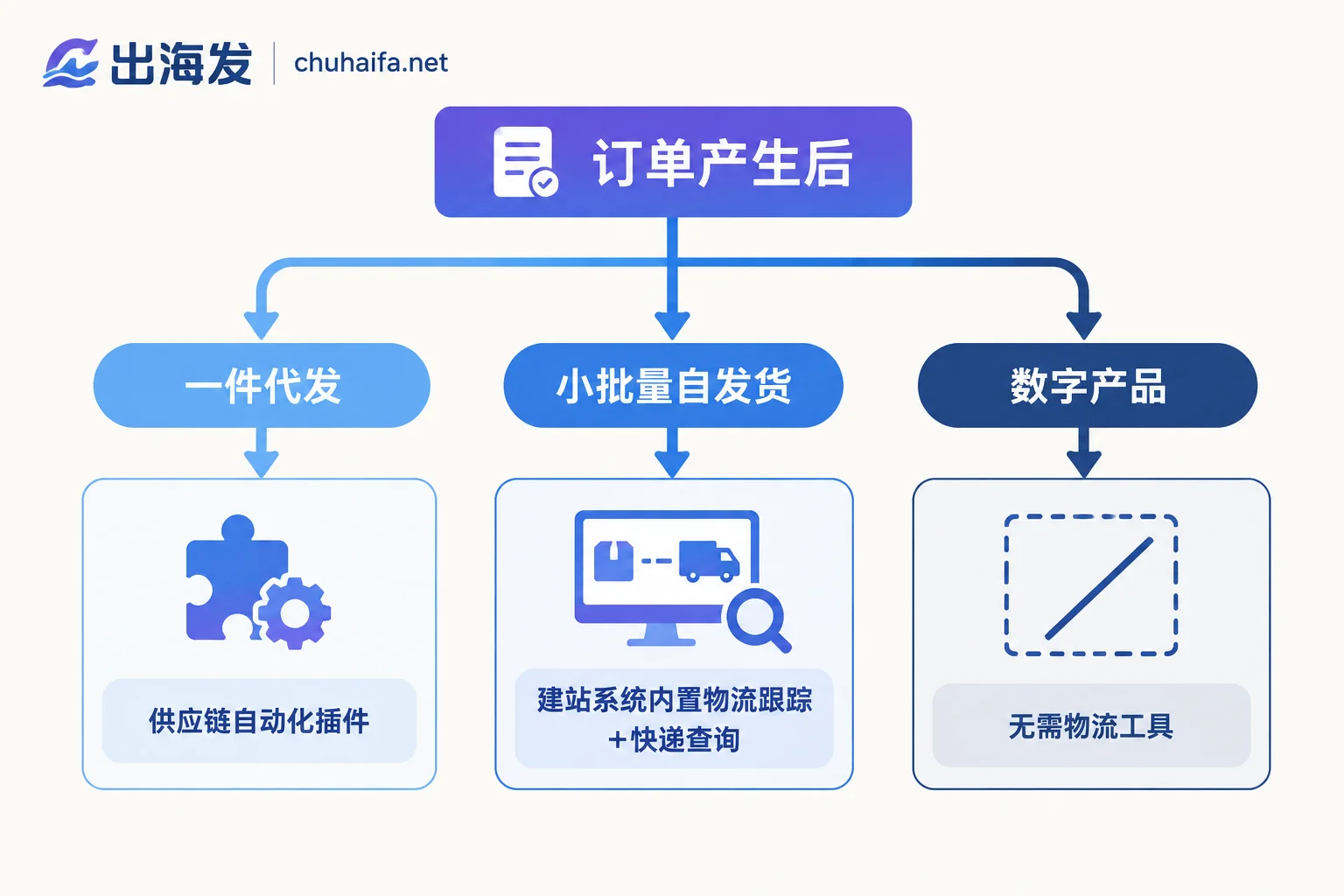
- Dropshipping: Add 1 supply chain automation plugin, such as DSers or a supplier direct-connect tool, to sync products, place orders automatically, and return tracking numbers. This is the “5th category” mentioned earlier.
- Small-batch self-fulfillment: No new tools needed. Use the site builder's built-in logistics tracking plus a free international courier tracking tool (like 17TRACK) to return tracking numbers—more than enough before order volume grows.
- Digital products / virtual services / software: No logistics step; skip this category entirely and focus on automatic delivery and shipping emails.
When do you need a standalone ERP? When order volume, SKU count, or sales channels become too many to handle manually. When you reach that point, What free cross-border e-commerce ERPs are available lists several that can be used long-term and explains where free versions hit limits.
What not to install at the start
The most common way solo founders fail isn't too few tools—it's plugin overload: marketing popups, countdown timers, currency converters, various rating and recommendation modules. They disrupt page code structure, lengthen load times, lower mobile conversion rates, and add up monthly subscription fees—pure expense when you have no orders yet.
Also postpone: dedicated email marketing tools (like Klaviyo), professional SEO analysis tools (like Ahrefs, Semrush), and standalone data dashboards. These are good tools, but their value is built on “already having traffic and order data to analyze.” Introduce them one by one after steady orders appear. The criterion is straightforward: can this tool save you clear time, or bring measurable incremental gains?
Asset production is an exception—if you're targeting multiple language markets, AI tools can save a lot of repetitive work early on. For how to combine them, see How to combine AI tools for multilingual sales content.
Suggested launch order
- Register the domain (done the same day)
- Set up the site builder, build the skeleton, upload 1–5 SKUs—don't chase perfection yet
- Apply for payment channels in parallel—review takes time, do it alongside step 2
- Run a small real test order: place an order yourself, pay, check if the backend receives it, then refund—confirm the loop actually works
- Connect fulfillment tools (choose based on your business model, or confirm you don't need them)
- Turn on that one traffic channel
Step 4 is the easiest to skip and the most prone to problems. Many people only discover after running ads and getting their first real order that the checkout page doesn't work in a certain country, or the payment account is still waiting for additional documents.
Where to go next to pick specific tools
After determining which categories you need, browse specific options by category: site builders and dropshipping tools are in the Cross-border E-commerce category; acquiring channels and e-wallets are in the Overseas Payments category; tools for starting channels are in the Overseas Promotion category. Each links directly to the official site; features and prices are subject to the current pages on each official site.
If you want to break down the “site building to payment collection” segment in more detail, Which categories of tools are needed from site building to payment collection for a DTC site expands it step by step—you can compare it with this article's minimum list.