

When creating multilingual product content, the real bottleneck is usually not "which AI tool is the strongest," but what you already have on hand. Even for producing ten Spanish short videos, having a single proven Chinese final cut versus just a white-background image requires completely different tools and workflows.
So let's first divide by starting point, then talk tools.
Three Starting Points, Three Combination Routes
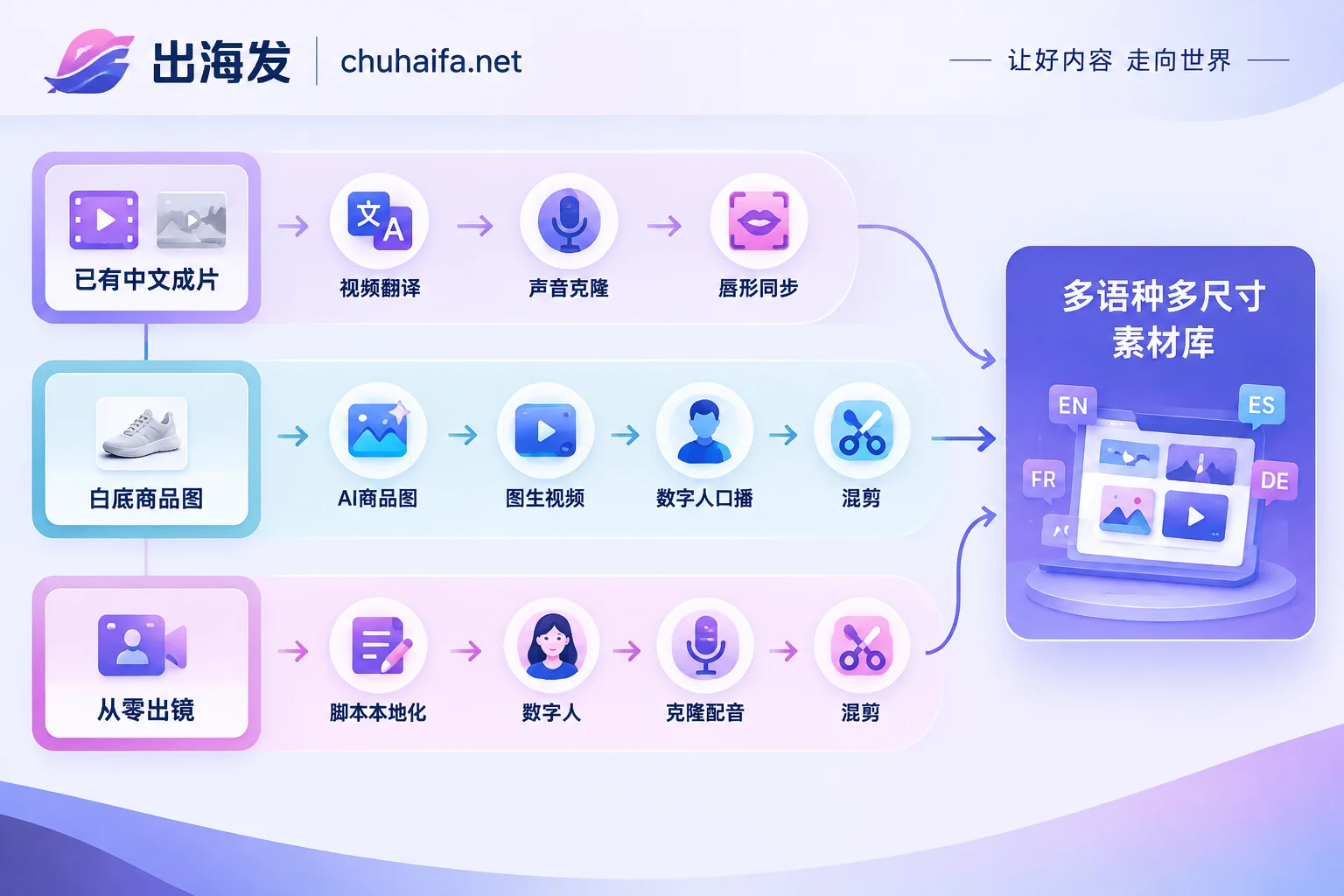
Starting Point 1: You Already Have a Proven Chinese Final Cut
For short videos you filmed yourself, received from influencers, or that already have performance data on-platform, the most cost-effective approach is AI video translation + dubbing + automatic lip-sync: feed the original video into a multilingual translation tool, clone the original voice timbre, and realign the lip movements to the new language. Tools like HeyGen follow this path, saving the cost of re-shooting and finding actors in every country.
This route has a prerequisite: translation won't make mediocre content better. The original's pacing, hook, and selling point order are carried over to the new language as-is, so prioritize translating the videos that already have conversion data, not the entire asset library.
Starting Point 2: You Only Have White-Background Images or Product Page Assets
The chain is longer, typically four steps:
- Use AI product image tools to change backgrounds, generate scene images, and create selling point layouts (like Canva, Yike Tu);
- Turn key images into image-to-video dynamic close-ups to showcase materials, details, and usage processes;
- When narration is needed, add a digital human presentation (like HeyGen, Synthesia);
- Finally, mix and edit into feed ad versions in editing tools (like CapCut international version).
This route essentially brings static images "to life," suitable for stages where you don't have shooting conditions yet but need to test products at scale first.
Starting Point 3: Building Live-Action from Scratch
Define the script before the person. After script localization, using a digital human with cloned voice is much faster and cheaper than finding actors in multiple countries. But be clear about its scope: this type of content is better for ad testing and scaling, while long-term brand content and accounts needing personal trust ultimately require live-action elements.
The Five Stages of the Complete Workflow
Regardless of the route, tools fall into these five categories, and the order is basically fixed:
1. Script planning and localization. Use large language models to extract selling points from product pages, reviews, and original scripts, then rewrite according to target market expression habits—not sentence-by-sentence translation, but replacing parts locals wouldn't say that way (units, holidays, price comparison methods, pain point wording). If this step is done poorly, all subsequent stages amplify an unnatural script.
2. Product visuals and scene reshaping. AI product image background changes, foreign model face swaps, image-to-video clips. This step determines whether the content "looks like something sold locally."
3. Multilingual voiceover and voice cloning. High-quality TTS output with authentic pronunciation and emotion. Tools like ElevenLabs are often used together with digital human tools.
4. Video generation and lip-sync. Digital human presentations, or cross-language dubbing of existing videos with realigned lip movements.
5. Post-production editing and batch distribution. Automatic bilingual subtitles, aspect ratio adaptation, multi-version mixing.
What Really Matters When Choosing Tools
Voiceover realism is the top priority. In multilingual campaigns, machine-translated copy and robotic voiceovers are among the main reasons for low click-through rates. When testing, don't just listen to a single sentence—listen to a full 30 seconds. Many tools sound natural in short sentences but fall apart in longer ones. Tools with voice cloning and emotion control usually outperform those with only default voices.
Verify lip-sync per language. A tool's website listing "supports 50+ languages" doesn't mean consistent quality across all. For smaller languages like Thai, Vietnamese, and Arabic, there's currently no reliable public comparison data on lip alignment and slang translation—you'll need to test two or three of your own videos before deciding to scale.
Subtitles and aspect ratios must support batch export. Manually exporting 9:16, 1:1, and 16:9 versions for one video isn't painful, but doing it for fifty videos a day is. When choosing tools, check directly whether they can export multiple sizes at once and whether subtitles can be auto-burned with bilingual support.
Don't apply one company's rules to all tools. Terms vary across platforms regarding commercial licensing, whether cloned voices require personal authorization, and whether generated content can be used in paid ads. Features and pricing are subject to each official website—if you're going commercial, read the terms page thoroughly first.
Batch Variations: Where AI Actually Saves Money
The core value of AI tools isn't producing one perfect brand video, but generating many variations at low cost for testing. The typical arrangement: for the same SKU, write 3–5 hooks (first 3 seconds) based on different pain points (price, scenario, specific pain point), pair each hook with the main content, export the required aspect ratios, then run ads to see which combination wins, and translate the winner into other languages for scaling.
In terms of order, test hooks first, then the main body, and only then switch languages for volume. Doing it in reverse—translating a dozen assets into six languages from the start—means spreading your budget on unvalidated creative.
For hook references, you can look at competitors' running ads. For the tool capabilities in this area, see What platforms' ads can ad monitoring tools see; for multi-account, multi-platform scheduling and distribution after content is ready, that's a different set of tools—see What tools to use for multi-platform social media scheduling.
Common Pitfalls
- Confirm authorization scope before cloning an influencer's original voice. For assets delivered by influencers, the contract may not include "using AI to clone their voice for new language versions."
- Don't use one digital human for all markets. The same persona's acceptance varies greatly by region—at least create several sets for major regions.
- Have someone review subtitles after dubbing. Especially product specs, sizes, prices, and promotion rules—errors here cause after-sales issues, not just content problems.
- Platform policies change. Some platforms require labeling AI-generated content, and rules differ across platforms. Before scaling, refer to the target platform's official announcements.
Where to Go Next for Tools
Map the above stages to tool categories. The two types you'll actually need this round are usually: scripts, voiceovers, product images, digital humans, and video translation—all under the AI Tools channel; for competitor research, batch ad placement, and asset management after content is done, see Ad Tools. If the content is for influencer outreach and organic social traffic rather than pure paid ads, see Overseas Promotion.
First determine your route based on your existing assets, then pick one tool from each corresponding category and test three videos—once that works, then talk about scaling.