

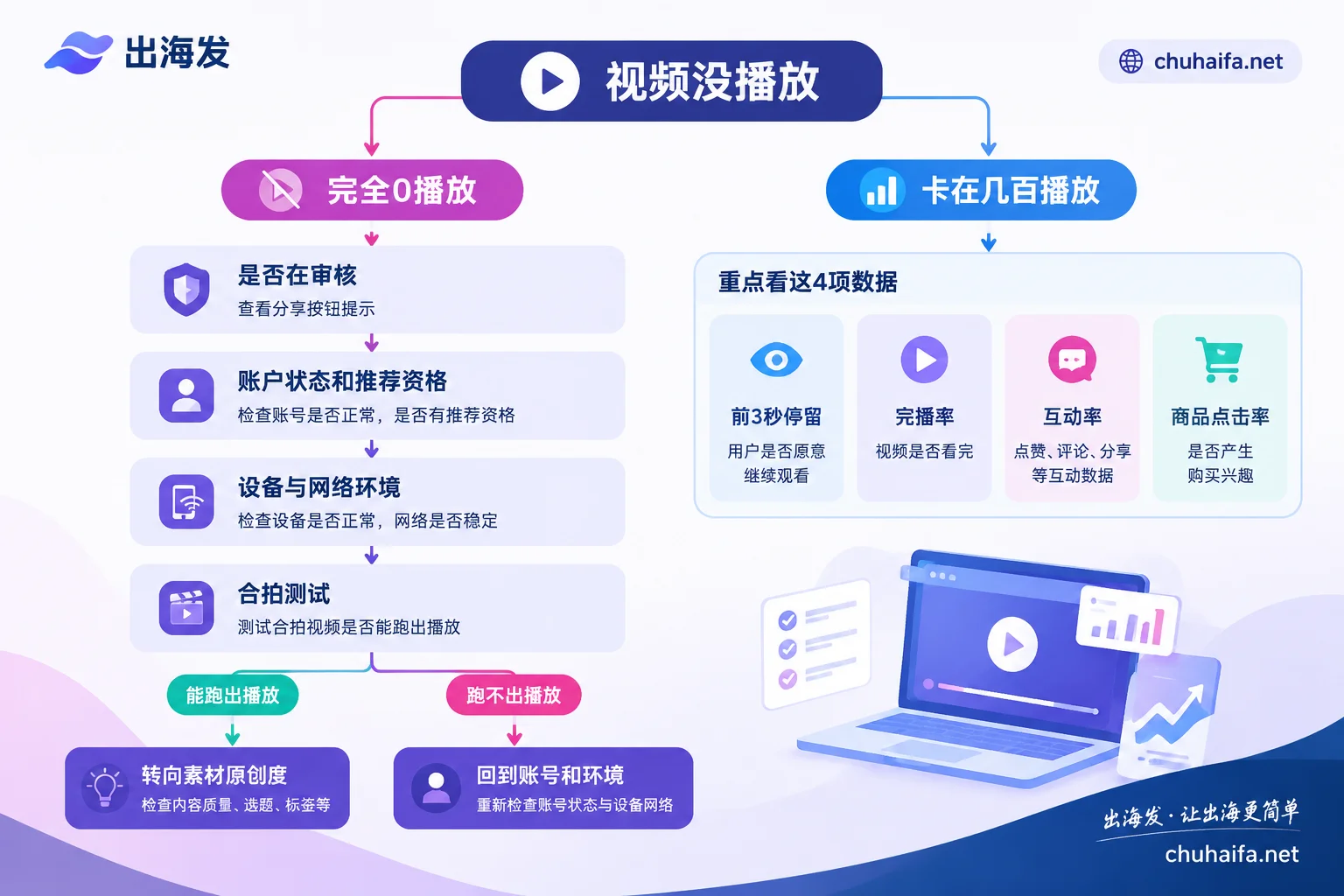
Let's start with the conclusion: if your product video has no views, first check whether it's completely at 0 views or has a few hundred views and then stops growing.
- Completely 0 views: The problem is likely before the video enters the recommendation feed. It could be that the review isn't finished, the account or this specific video has lost recommendation eligibility, or the device and network environment are being risk-controlled.
- Stuck after a few hundred views: This means the video has entered the recommendation feed, but the data hasn't met the threshold to enter the next traffic pool. In this case, the problem is usually with the content itself; changing environment or account won't help much.
The troubleshooting directions for these two situations are different. Below, we'll go through free checks first, then environment and content adjustments, using TikTok as an example. Other platforms follow similar logic; refer to each platform for specific menus and rules.
Step 1: Confirm whether the video is still under review
For videos posted by new accounts, or product videos with a product link (shopping cart), besides regular content review, they also go through e-commerce compliance review. Operations experience suggests that after publishing such videos, it's normal to have no data for 2 to 12 hours, so seeing 0 views an hour after posting doesn't necessarily mean you've been shadowbanned.
A simple way to check: tap the "Share" button on the video. If you see a message like "This video is under review and cannot be shared," it's still being reviewed—wait until the review is over and check the data again. You don't need to change any settings at this step, and don't rush to delete and repost. Reposting the same video may trigger the duplicate content issue mentioned in Step 5.
Step 2: Check account status and individual video recommendation eligibility
If it's still at 0 views after review, the next step is to see if the platform has given a clear action. TikTok officially provides two places to check:
- Account Status: Check in "Settings and privacy" or TikTok Studio. It shows whether the account has violations or restrictions.
- Individual video recommendation eligibility: If a video involves commercial violations, music copyright issues, or low-quality marketing, the platform may mark it as "Not Eligible for the For You feed." Once marked, the video is usually only visible to followers or profile visitors, so views are near zero. The reason can usually be found in inbox notifications or the video's analytics page, and you can submit an appeal.
Common issues for product videos fall into two categories: using popular music without commercial authorization, and exaggerated claims in voiceover or subtitles. If the platform gives a specific reason, just modify or appeal accordingly; no need to dig into environment issues.
Step 3: If no official notice but the whole account has no views, check device and network
If account status is normal, the video isn't marked, but every video from this account gets 0 views, consider the operating environment. Commonly mentioned check items from third-party operations experience include:
- Whether there's a domestic SIM card in the phone: The platform can read carrier information. Many operators avoid inserting domestic SIM cards in phones used for overseas accounts.
- Whether the IP is clean and matches the target country: Shared data center nodes or IPs used by many people and flagged by the platform can suppress new videos from the start. For product accounts, a common choice is a dedicated residential IP from the target country.
- Whether system language, time zone, and DNS match the IP location: Set the time zone to the city of the IP, not just the country. GPS location should also not conflict with IP location.
These checks vary depending on your operating method. When using real devices, focus on SIM card, location, and system settings. When using cloud phones or fingerprint browsers on PC for multiple accounts, focus on whether each environment's fingerprint parameters correspond one-to-one with proxy IPs and whether there's cross-contamination. For device form factors, see Cloud Phone vs. Emulator for Multi-Accounting: Which to Choose, and for proxy types, see What Tasks Are Residential Proxies and Data Center Proxies Suitable For?.
Note that environment issues are only one common cause of 0 views. After adjusting the environment, it's best to confirm with the next step's method. Don't switch accounts before identifying the problem.
Step 4: Use a Duet test to distinguish whether the problem is the account or the video
This step determines whether the problem is the account environment or the specific video: use this account to Duet a currently trending original video, post it, and observe the views.
- The Duet gets normal views: This means the network, device, and account are basically fine. The problem is more likely with the original product video; continue to Step 5.
- The Duet also gets 0 views: The problem is more likely with the account or environment. Go back to Steps 2 and 3. If after multiple adjustments there's still no improvement, consider whether the account is worth keeping.
This is a common empirical judgment method in operations, not an official diagnostic tool, but it's low-cost and can help avoid wasting time in the wrong direction.
Step 5: Check if the product material is reused or low in originality
If the problem is with a single video, the most common cause for product accounts is reusing material. Directly using product videos from domestic e-commerce platforms or clip videos from competitors can easily be detected by the platform's duplicate check, leading to limited reach or even being flagged as duplicate listing.
Common deduplication methods online include frame extraction, mirroring, speed changes, and filters. These can reduce visual duplication, but they alone don't guarantee effectiveness, and the platform's judgment of "non-original content" isn't based solely on visuals. A more reliable approach is to truly change the content structure:
- Redesign the aspect ratio and opening shot, and change the order of selling points for the target market;
- Rewrite the copy and subtitles in the target language, and re-record the voiceover;
- Replace background music with commercially licensed tracks.
If you only have Chinese material, you can use AI tools for translation, voiceover, and subtitle localization. For specific workflows, see How to Combine AI Tools for Multilingual Product Material.
Stuck at a few hundred views and no longer growing: Look at content data
If a video gets a few hundred to around 500 basic views and then stops growing, it means it has entered the recommendation feed but didn't pass the next round of screening. This is rarely caused by network or environment risk control; changing IP or account usually won't solve it.
For product videos, focus on the following data points, which can be checked item by item in the video analytics:
- First 3-second retention rate: Low data means the opening didn't hold viewers. Try putting the most engaging visual or pain point in the first second.
- Completion rate: Low data means the middle is dragging. Shorten the length and remove repetitive shots.
- Engagement rate (comments, shares): End with a specific question to encourage comments.
- Shopping cart click-through rate: If views are decent but clicks are low, the video content may not relate directly enough to the product, or the price and selling points aren't clear.
When these data points are below the average for similar categories, the algorithm won't push the video to the next traffic pool. Specific standards for each category change, so it's best to compare with your own better-performing videos and fix the biggest gap first. Posting frequency and intervals also affect data; see How Many Short Videos to Post Per Day for Overseas Accounts.
What tools to add after troubleshooting
Depending on which layer the problem is at, you need different tools:
- Problem with network and IP: Compare residential proxy services in the Overseas Network category, focusing on whether they're dedicated, whether you can choose a specific city for the IP location, and how long sessions last.
- Operating multiple accounts on PC, problem with environment isolation: Choose from the Fingerprint Browser category, focusing on whether each environment can bind a proxy separately and whether time zone and language can automatically follow the IP.
- Problem with material originality and localization: Find translation, voiceover, and editing tools in the AI Tools category.
For specific features and prices of each tool, refer to their official websites. If the first two steps have already found an official reason, just modify the content or submit an appeal; no need to add extra tools.