

Many people immediately double their budget when they see "limited by budget," but what they should really do is follow a four-step troubleshooting process using Google Ads tools: verify status, check conversion tracking, separate target from budget, then calibrate using the official bid target adjustment tool. Starting August 17, 2026, Google Ads has adjusted the operating logic for smart bidding strategies. For Search, Shopping, Performance Max, and Demand Gen campaigns in a "limited by budget" status, the algorithm will strictly converge toward the set tCPA/tROAS targets. The old practice of relying on budget constraints to "pick up" low-cost conversions is no longer effective.
Conclusion First: 4-Step Order for Troubleshooting Budget-Limited with Google Ads Tools
Troubleshooting "limited by budget" isn't about immediately increasing spend. Instead, follow these four steps:
- Verify the status is real: Confirm the campaign is truly limited by daily budget, not just a distorted target value.
- Check conversion tracking: Verify which conversion actions your tCPA or tROAS is attributed to.
- Separate target from budget: Understand that budget determines how much you spend, while target determines how you bid—these are two different levers.
- Calibrate using the official bid target adjustment tool: Use the tool in your account to align targets with recent actual performance, or set custom new targets.
This sequence helps you avoid losses from blind bidding adjustments. By default, if you ignore the "limited by budget" notice, after August 17, 2026, the system will gradually pull actual costs toward your set target—for example, if target CPA is $10 and actual is $5, the account will slowly drift to $10 (Source: Google Ads official help documentation, 2026-08-11). So reordering the process is essential for current campaign management.
Step 1: Determine if "Limited by Budget" is a Real Ceiling or Just a Notice
The official criterion for "Limited by budget" is straightforward: the campaign's average daily budget is below the system's recommended budget. It indicates there is untapped traffic and conversion potential under the current bids and targeting. It's essentially a growth notice, not an error.
However, many people see the limit and immediately double the budget, which is wrong when targets are not being met. If the current CPA is far above the target, increasing budget only amplifies losses. The correct approach: first check if actual CPA is close to the target. If actual CPA is significantly higher, the problem isn't budget but bid target or conversion tracking.
Step 2: Verify Conversion Tracking to Confirm Which Conversion Action Your Target Applies To
A quick explanation of tCPA vs. tROAS: tCPA targets cost per conversion, while tROAS targets return on ad spend. Both only apply to actions counted as conversions. If your conversion goals mix add-to-cart, sign-ups, and purchases, the deviation between target and actual cost stems from tracking definitions, not the algorithm.
Additionally, when conversion volume in the last 30 days is insufficient, data noise amplifies deviations. Google recommends that campaigns have at least 15 to 30 conversions in the past 30 days for stable model convergence (Source: Google Ads help documentation, 2026-07-05). So during troubleshooting, open the conversion report to confirm which action you're optimizing.
Step 3: Separate Target Value from Budget Relationship—Adjusting Target Isn't Adjusting Spend
Budget determines how much you spend, and target determines the bid price. These are two independent levers. Many optimizers mistakenly think lowering tCPA will reduce spend, but it can backfire. Lowering tCPA affects the bid level for individual auctions, potentially reducing auction participation and causing budget under-spend, but it doesn't proportionally reduce costs. Google does not disclose the exact reduction amount; you need to rely on your own account data over 1-2 conversion cycles.
Under the new mechanism, accounts in a limited state will converge toward the set target. For example, with a target tCPA of $10 and actual performance of $5, the actual cost will gradually drift to $10 if left unadjusted. This means if you think actual CPA is too low (e.g., $5), don't assume the system will keep it; it will gradually rise to your target.
So, when troubleshooting, look at them separately: if actual CPA is below target, your target may be set too high, and the system is moving toward you; if actual CPA is far above target, your target is too low, or there's a tracking issue.
Step 4: Calibrate Once with the Official Bid Target Adjustment Tool (Entry Points and Three Options)
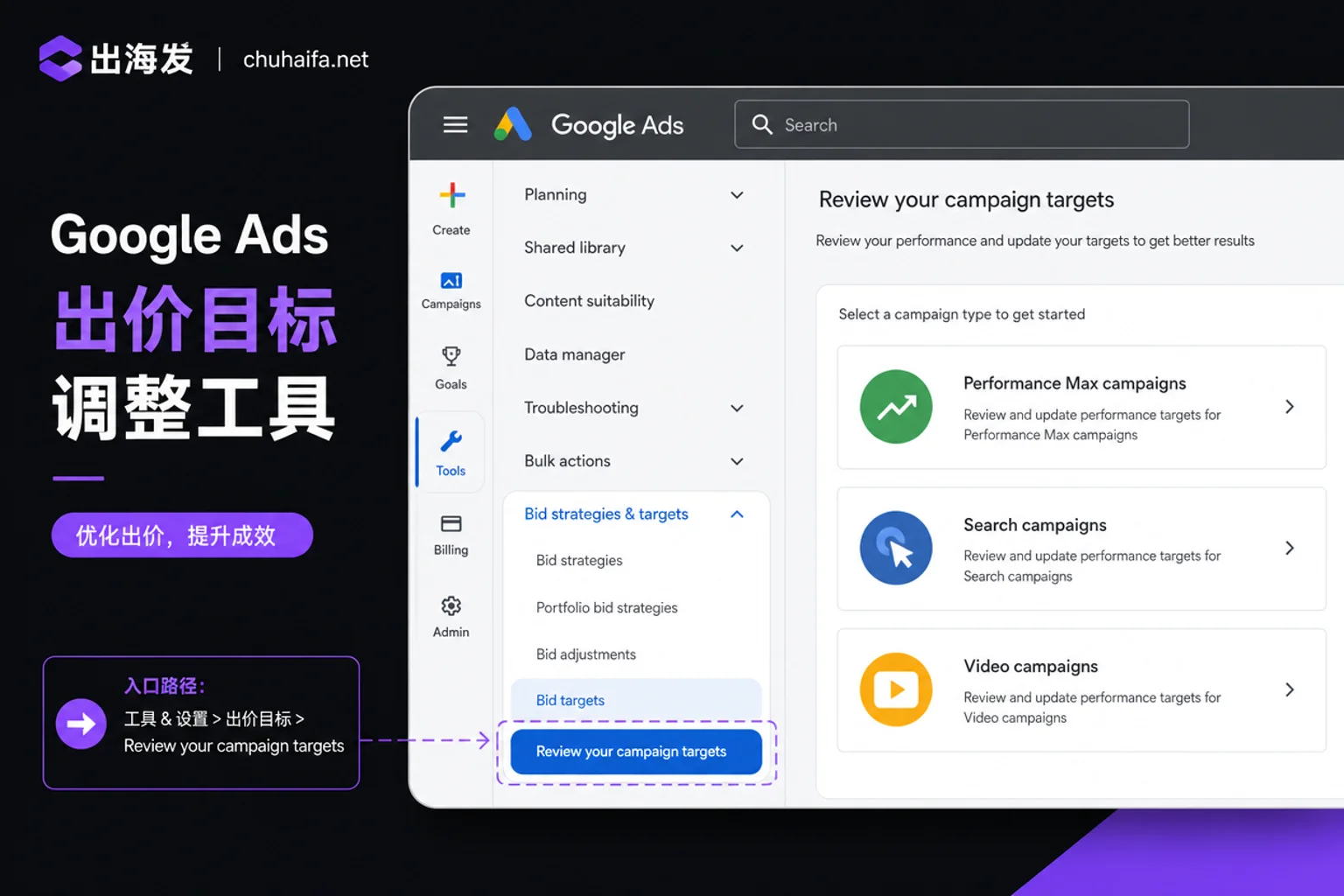
This step uses the official Bid Target Adjustment Tool. It has two entry points:
- Account top notification banner: "Review your campaign targets"
- Path: "Campaigns - Settings - Bidding - Review campaigns"
The tool shows historical actual performance and offers three options:
| Option | Suitable Scenario |
|---|---|
| Keep existing target | You are confident the target is reasonable, budget is temporarily limited, and you have sufficient conversion data |
| Match recent performance | Recent actual CPA/ROAS deviates greatly from target, and the deviation comes from algorithm convergence |
| Enter custom new target value | You have a clear new target value and sufficient conversion data to support it |
The choice depends on your situation. For example, if actual CPA is much higher than target, don't rush to change the target; use the historical performance data in the tool to determine if it's a tracking issue or algorithm issue.
After Adjusting: Observation Window and Rollback Line
After adjusting bid targets, the algorithm needs 1-2 conversion cycles (or a learning period depending on conversion delay) to recalibrate. During this time, avoid frequent changes to keep the model stable.
To set an observation window: use one conversion cycle as the minimal unit, and observe at least two cycles. During this period, focus only on trends, not daily fluctuations. If after two cycles actual CPA hasn't moved toward the target, or fluctuations exceed acceptable levels, consider rolling back or recalibrating.
Google has not disclosed specific transition days for different industries after the algorithm switch, so don't blindly trust online claims of "seeing results in 3 days." Always base decisions on actual data.
An Outdated Practice: Why Raising tCPA to Let the System "Pick Up" No Longer Works
Previously, many optimizers deliberately set high tCPA when budget-limited, relying on budget caps to force the system to "pick up" low-cost conversions. But this operation is now completely ineffective. Since August 17, 2026, for Search, Shopping, Performance Max, and Demand Gen campaigns in a limited state using smart bidding, the system will strictly converge toward the set tCPA/tROAS. If you raise tCPA from $10 to $20, the system will move actual costs toward $20, not continue finding $5 conversions.
So, any experience like "raise targets to game the system" will now cost you real money.
Processing Paths by Budget Scale: Three Account Types
Accounts of different budget scales have different processing orders and priorities:
| Account Type | Characteristics | Processing Path |
|---|---|---|
| Small budget, single market | Low daily budget, few conversions | Build conversion data first (15-30 conversions in 30 days), then adjust bids; hold off on budget changes |
| Medium budget, multiple campaigns | Budget dispersed; some campaigns limited | Use the tool to align with recent performance first, then allocate budget by priority |
| Multi-site, multi-currency | Conversion rates vary greatly by site | Check conversion tracking per site, then calibrate targets individually; avoid uniform optimization |
For a more complete comparison of channels and tools, refer to Overseas Promotion Tool Selection.
Troubleshooting Checklist
Here’s a checklist that maps each step to the Google Ads tools you need. This list helps you quickly run through the process and categorizes the tools used, making it easy to bookmark:
| Step | Check Item | Tool Entry |
|---|---|---|
| Status Verification | Is it truly budget-limited? | "Status" column in campaign list |
| Conversion Tracking | Which conversion action does the target apply to? | Tools - Conversions |
| Target vs. Budget | Direction of actual CPA deviation from target? | Bid Target Adjustment Tool |
| Calibration | Keep, align, or custom? | Campaigns - Settings - Bidding |
| Observation | Converged after 2 conversion cycles? | Ads report - Time range |
The mechanism change on August 17, 2026 means cross-border advertising can no longer use the old "budget constraint to pick up" approach. Tool selection now needs to support true target convergence. From bid diagnosis, budget allocation, conversion tracking to ad reporting, the four entry types each have distinct uses: bid diagnosis helps you see the direction of deviation between target and actual; budget allocation checks if it supports simulated allocation by campaign priority; conversion tracking distinguishes add-to-cart, sign-up, and purchase actions; ad reporting is for observing convergence trends over 1-2 conversion cycles. These four entry types can also be compared with Cross-border E-commerce Tools from Chuhai to create your own troubleshooting checklist.
Frequently Asked Questions
What should I do if my campaign shows "limited by budget"?
Don't increase budget immediately. Use the status column to confirm if it's truly limited, check conversion tracking, then look at the relationship between actual CPA and target. If your actual target is met and only traffic is limited, consider increasing budget; if not, calibrate the target using the bid target adjustment tool. After August 17, 2026, Performance Max campaigns in a budget-limited state will also strictly converge to the set target, so the target value must be calculated correctly first.
Where is the Google Ads bid target adjustment tool?
Two entries: the "Review your campaign targets" banner at the top of the account, or via "Campaigns - Settings - Bidding - Review campaigns." Once there, you'll see historical actual performance and options to keep, align, or custom set target.
Why is actual CPA much higher than target CPA?
First check if conversion tracking mixes different actions, then check if conversions in the last 30 days are fewer than 15 (data noise). If these are normal, the target may be set too low, causing insufficient bidding and only high-cost traffic being obtained.
When budget-limited, should I increase budget or lower tCPA?
It depends on whether actual CPA is meeting the target. If actual CPA is already above target, adjust the target first rather than increasing budget; if actual CPA meets and is close to target, and only traffic is insufficient, you can increase budget. After August 17, 2026, raising tCPA in a limited state will increase actual costs, so don't "pick up."

Tool Navigation Suggestion: Categorize and bookmark common bid diagnosis, budget allocation, conversion tracking, and ad reporting tools by capability. Budget allocation tools should support simulated allocation by campaign priority; conversion tracking tools should distinguish add-to-cart, sign-up, and purchase actions; ad reporting tools should allow custom time ranges to compare convergence trends. For TikTok channel extensions, also check TikTok Operation Tools.