

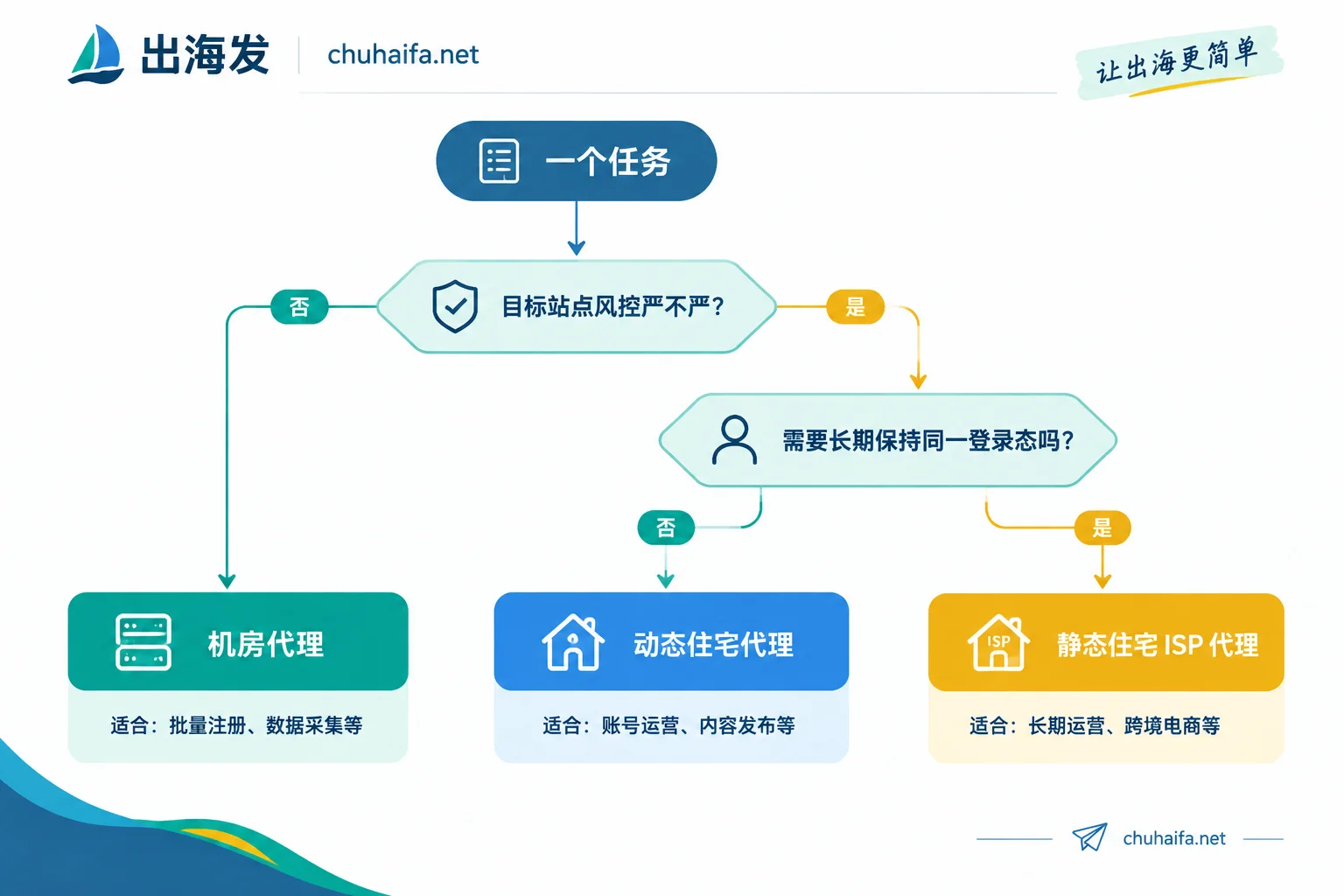
The decision comes down to just two lines: how strict the target site's risk control is, and whether the task requires maintaining a long-term logged-in session on the same IP.
- Weak risk control, no login state needed → Datacenter proxies. Public data scraping, API stress testing, large file downloads.
- Strict risk control, no fixed identity needed → Rotating residential proxies. High-risk e-commerce scraping, price comparison, ad verification.
- Strict risk control, fixed identity needed → Static residential (ISP) proxies. Multi-store operations, social media matrix accounts, payment and authentication operations.
Budget is not the primary criterion. The proxy fees saved by using datacenter IPs won't outweigh the loss of a mature store being banned due to association; conversely, using residential proxies for stress testing and media downloads will cause traffic bills to spiral out of control within days. Let's break down each type of task and the reasoning behind it.
What Exactly Are the Differences Between the Three Types of Proxies
ASN ownership determines the first impression. Datacenter IPs are allocated by data centers or cloud hosting providers, with ASNs showing host providers like AWS, OVH, Hetzner. IP ranges are concentrated and contiguous, allowing risk control databases to flag them in blocks. Residential IPs come from consumer ISPs assigning addresses to real home broadband or mobile networks, with ASNs showing Comcast, AT&T, Vodafone, etc. Target sites treat them as ordinary users by default.
This difference is directly reflected in block rates. On sites with anti-bot mechanisms deployed, datacenter IPs commonly trigger blocks and CAPTCHAs at rates of 30–50%; residential IPs on similar sites can usually be kept below 1%. Actual numbers vary greatly by site and time, and pool quality differs across providers—treat these as order-of-magnitude references, not guarantees.
Speed and concurrency are the reverse. Datacenter proxies run on backbone networks, with response times typically 50–100 ms, supporting high concurrency and high-throughput transfers. Residential proxies go through real home lines, with higher latency, more jitter, and concurrency limited by exit nodes. For raw throughput, datacenter is more suitable.
Billing method determines which tasks are affordable. Datacenter proxies are often billed by IP count or fixed bandwidth monthly packages, with unlimited or very generous traffic allowances; residential proxies are predominantly billed per GB. This alone almost dictates that download and stress-testing tasks cannot be handed to residential proxies.
Static residential (ISP proxies / dual ISP proxies) are an intermediate form. The machine is hosted in a data center, ensuring stability and upstream bandwidth, but the IP range is obtained and registered from consumer ISPs, presenting residential attributes externally. It combines both "fixed and unchanging" and "residential trust signal"—exactly the combination needed for account-related tasks.
Tasks That Should Be Handed to Datacenter Proxies
- Batch scraping of public pages: Target sites without strict anti-scraping and no login required, such as government open data, industry directories, and most corporate websites.
- High-frequency API testing and performance stress testing: These tasks need concurrency and stable throughput; residential lines are the bottleneck here.
- Large file and media downloads, mirror synchronization: Residential proxies billed per GB become unreasonably expensive here.
- Content monitoring without login, search result and competitor tracking: Budget-sensitive, high-volume routine monitoring. But search engine risk control is constantly changing—once CAPTCHA rates rise significantly, this pipeline should be upgraded to rotating residential.
- Internal system access, CI egress IP whitelisting: What's needed is a fixed, predictable egress address; trustworthiness is not an issue.
Tasks That Should Be Handed to Rotating Residential Proxies
- Price, inventory, and review scraping on high-risk e-commerce platforms: Such sites basically deny datacenter IP ranges by default.
- Price comparison scenarios for flights, hotels, food delivery, etc.: Not only residential IPs but also country- or even city-level targeting, otherwise the prices obtained are simply wrong.
- Ad verification and fraud detection: Need to see actual ad delivery from the network position of real users in the target market; datacenter IPs often see a different set of results.
- Localized content and price scraping: The same product displays differently in different regions; targeting precision directly affects data usability.
Rotation strategy should align with the task: stateless single-page scraping uses per-request rotation; multi-step processes that need continuity (pagination, add-to-cart to check shipping) require sticky sessions, holding the IP for minutes to tens of minutes. Definitions of rotation granularity, session duration, and billing vary by provider—refer to the provider's official documentation.
Tasks That Should Be Handed to Static Residential (ISP) Proxies
- Cross-border e-commerce multi-store anti-association: For platforms like Amazon, eBay, TikTok Shop, a store should be bound to one fixed IP long-term—the account's network environment must be stable.
- Long-term login and account nurturing for social media matrix accounts: Platforms like Facebook, Instagram, X, Reddit treat frequent IP jumps as an anomaly signal in themselves.
- Cross-border payments and sensitive authentication operations: Actions like account opening, verification, and withdrawals have the highest requirements for environmental consistency.
These tasks have three hard requirements: the IP must be exclusive, not one that comes up in a shared pool; the IP's geolocation must match the account profile, payment information, and commonly used language; and once bound, it should not be changed.
One more thing to clarify: proxies only solve the network layer. Browser fingerprinting, cookie isolation, timezone, and language are another layer. Account-related tasks require fixed IPs together with anti-detect browsers—doing only one side is of little use. For trade-offs in this area, see Are free anti-detect browsers enough for multi-account e-commerce?.
Four Common Misconfigurations
- Using datacenter IPs to log into long-term accounts. The most expensive mistake. You save a few dozen bucks a month, but risk the entire store or account matrix.
- Using rotating residential proxies for account operations. The residential attribute is correct, but changing IP on every request means login state and geolocation are jumping—essentially creating anomalies yourself.
- Using residential proxies for stress testing and large file downloads. Traffic burns by the GB, concurrency is worse than datacenter—bad on both ends.
- Multiple stores sharing one egress. This includes IPs nominally "exclusive" but actually used by a previous user. When purchasing, ask clearly whether it's exclusive and whether it has a reuse history.
How to Estimate Costs Without Derailing Midway
For scraping tasks, estimate monthly traffic as "number of requests × average response size." There's an easily overlooked overhead: images, fonts, and JS consume the vast majority of traffic. Fetching only HTML or hitting APIs directly can reduce traffic by an order of magnitude. For account tasks, calculate as "number of IPs × monthly rent"—the count is fixed, making budgeting easier.
Also confirm several billing details, as policies vary: whether failed requests are billed, whether response headers count as traffic, how overage is charged, and whether packages have expiration dates. These should be clarified during the trial phase.
Implementation Order: Three Layers, Don't Mix in One Egress
Start with datacenter proxies by default, covering low-risk and high-traffic tasks, with controllable costs. When CAPTCHA rates and failure rates on a scraping pipeline rise significantly, switch only that layer to rotating residential—do not migrate everything. Account operations should use static ISP proxies separately from day one, completely separated from scraping pipelines—sharing an egress means risk control triggered by scraping will implicate accounts.
Do three things before purchasing:
- Check ASN and ownership to confirm the so-called residential IP's ASN is truly a consumer ISP, not a hosting provider.
- Run small-scale tests on the actual target site to see CAPTCHA trigger rates and success rates, not just ping values and ipinfo displays.
- Run real tasks during the trial period, including complete flows like login, pagination, and checkout. For static IPs, also observe over several days whether they truly remain unchanged.
Where to Go Next to Choose
Once you've determined which type you need, then look at specific providers. Network-side tools like proxies, VPS, and accelerators are catalogued by entry under the Overseas Network category, each linking directly to the official site; browser environments needed for account tasks are under the Anti-detect Browser category. If you want to go a step further and look at the protocol layer (HTTP/SOCKS5, rotation methods) and their correspondence with IP types, continue reading How to choose overseas proxy IPs? Match IP types and protocols by task. Pool sizes, pricing, and billing policies for each provider are subject to their official sites and change frequently—verify once more before ordering.