

How does TikTok determine misleading videos? The judgment only looks at the authenticity and consistency of three objects: spoken script, visual demonstration, and product detail page. The platform recently updated review policies in the US and UK, cracking down on absolute efficacy claims, falsified before/after comparisons, fake price markdowns, and undisclosed AI effects, with penalties extending to removal of commerce privileges. Below, we break down the four red lines into directly comparable templates.
First, Distinguish the Evaluation Targets: Script, Visuals, or Product Detail Page
How does TikTok determine misleading videos? Many operators think it only checks the spoken script for prohibited words. In reality, the platform reviews short videos, live streams, covers, spoken lines, on-screen text, and product detail pages (PDP) together in a global consistency check. If your video says "see results in three days" but the detail page says "improvement starts in two weeks," that mismatch is a classic misleading signal.
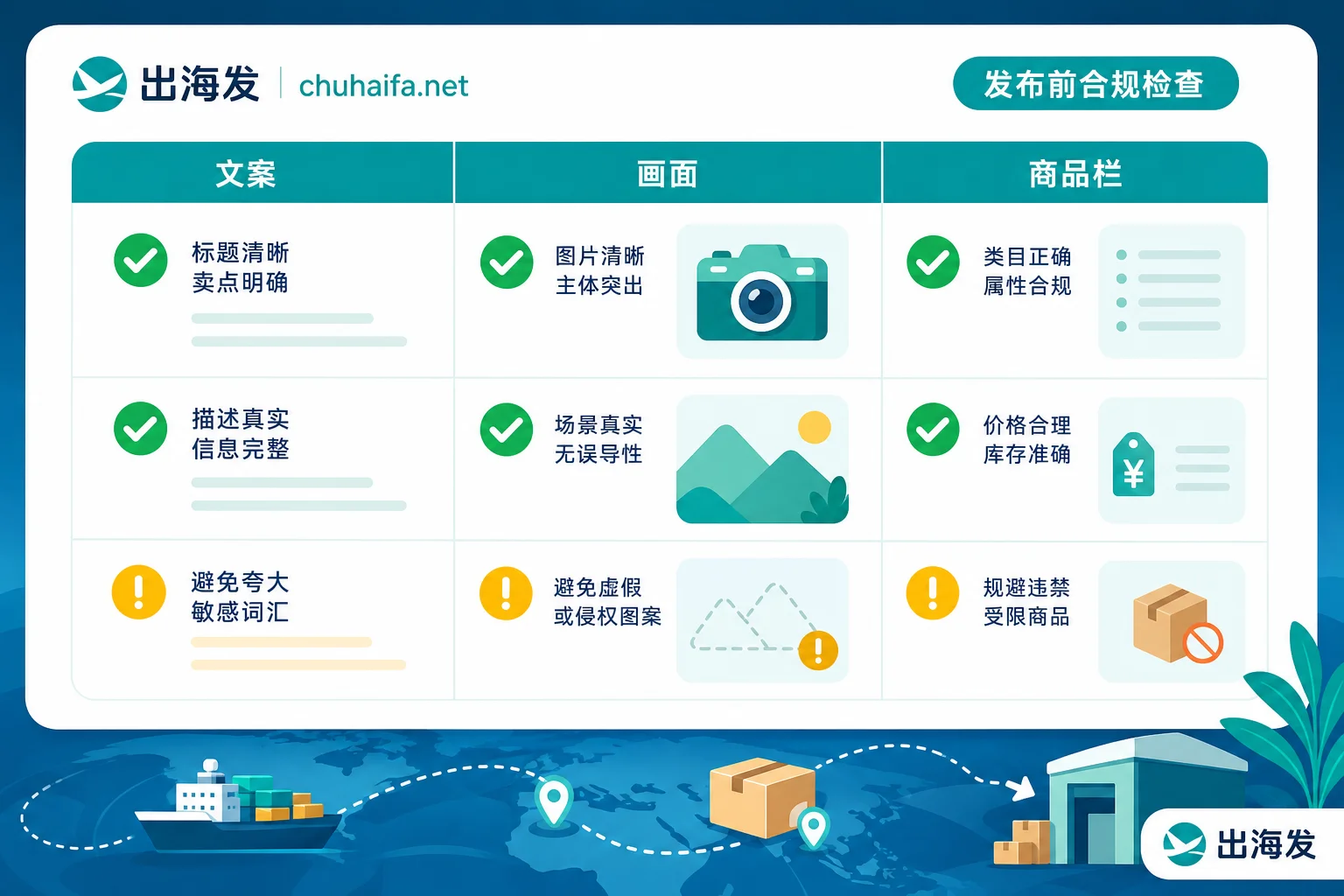
When self-checking, compare three columns: Script Column (spoken words + subtitles + cover text), Visual Column (demonstration process + effects/filters + comparison shots), and Product Column (detail page attributes + strikethrough price + inventory parameters). If any single column looks fine alone but contradicts the others, it can still be flagged.
Red Line One: Absolute Efficacy Claims—What Counts as Exaggeration and How to Make Claims Verifiable
"Will writing '100% effective' in a TikTok product video get flagged?" The answer is yes. Terms like "100% effective," "lowest price online," or "#1" are absolute claims that cannot be rigorously verified, and they fall under misleading assertions. According to TikTok Shop's Seller Center policy on misleading content, the platform doesn't check whether your product is truly #1; it simply treats such claims as lacking evidentiary support.
Replace unsubstantiated assertions with verifiable descriptions. For example, change "100% effective" to "According to third-party test reports, most subjects showed XX improvement within the testing period." Change "lowest price online" to "This promotion price is XX, XX lower than the regular price." Specific numbers must come from test reports or backend price records you can produce. Give data and conditions, and your claims hold up.
Red Line Two: Before/After Comparison Effects—Where Disclaimers Work and What They Can't Exempt
"Can I post TikTok before/after effect videos?" Yes, but disclaimers won't save you. According to TikTok Shop's policy on misleading content, disclaimers (like "results vary") only work in two scenarios: genuine comparison display or clear indication of the actual time period for achieving results. They cannot exempt fabricated exaggerations.
The key point for before/after comparisons is more about: jump cuts or filter editing compressing weeks of improvement into "instant results." Even if you add "Results may vary" all over, it's still considered fake demonstration. If you want to use comparison material, honestly show raw screen recordings and note real time intervals. If data looks abnormal after posting, you can check what's a low engagement rate for product videos to see if it's a content issue or throttling.
Red Line Three: Promotional Pricing—How Fake Original Prices and Discounts Are Detected
"How does TikTok determine fake strikethrough prices?" The system cross-compares promo prices and discount percentages in videos with listing parameters on the product detail page. If your spoken script says "save 300" but the detail page shows "199 minus 30," the big discrepancy is what the system catches. According to TikTok's commercial advertising policy, price claims follow the same consistency principle.
It's better to reverse the operational order: first set the real price and discount range on the detail page, then make all spoken words, subtitles, and stickers follow those numbers. Don't let editors improvise; have the script reviewed by operations for price parameters before posting.
Red Line Four: AI Filters and Synthetic Visuals—The Boundary Between Fake Function Demos and Compliant Use
"Do AI filters used for efficacy demos need to be labeled?" It depends. According to TikTok Shop's requirements for AI-generated content disclosure, the platform allows AI for script assistance, quality optimization, translation dubbing, and legitimate background rendering without extra disclosure. However, if it's highly realistic synthetic people or digital avatars, or if product visuals are materially altered, you must enable the "AI-generated content" label or clearly mark it in the video.
Three scenarios are absolutely prohibited: AI-fabricated efficacy, fabricated endorsements from experts or celebrities, and substitution of real products leading to mismatch. For example, an AI-generated fake image showing "smoother skin after use" would be fabricated efficacy; using AI face-swapping to make an expert praise your product is fabricated endorsement; rendering a counterfeit product to look like a premium brand is a mismatch.
What Happens After a TikTok Misleading Video Is Flagged: From Removal to Commerce Permission Penalties
"What are the penalties if a video is judged misleading?" The platform grades by severity: content removal, throttling, deduction of creator health score (CHR) or seller violation points, suspension of e-commerce features, and in severe cases, removal and freezing of violative funds. Specific point deductions or suspension lengths are not publicly disclosed, so don't guess.
If you're throttled, refer to how to recover from TikTok throttling. Reposting the same material with a different title obviously won't help—the violation record remains. If you think it's a mistake, appeal within the specified time by submitting evidence (like product test reports or full demonstration recordings) through Seller Center or the TikTok app.
Clarifying Common Misunderstandings: The Platform Doesn't Ban AI; It Bans Distortion
"Can I use AI-generated material in TikTok product videos?" Yes, but the community rumor that "all AI visuals and AI voices are banned in product videos" is an overinterpretation. The platform regulates distortion: as long as AI doesn't change the product's real form, fabricate effects, or fake endorsements, and you properly label photorealistic synthetic content as "AI-generated," you can post normally. Many teams avoid legitimate cost-saving tools out of fear, but sticking to the principles of "truthfulness + disclosure" is enough.
Pre-Publish Script Checklist: Tick Off Each Item Across Script, Visuals, and Product Pages
Consolidate the four red lines into a checklist that editors and reviewers can go through:
| Check Item | Script Column (spoken/subtitles/cover) | Visual Column (demo/comparison/effects) | Product Column (PDP parameters/strikethrough) |
|---|---|---|---|
| Efficacy description | No absolute terms like "100% effective" or "#1" | No AI-fabricated efficacy visuals | Detail page efficacy matches spoken script |
| Before/after comparison | Clearly state real time period | No jump cuts or filter editing faking "instant" results | Comparison parameters match detail page |
| Promotional pricing | Spoken discount matches strikethrough | No fake price stickers | Listing price matches description |
| AI material | Photorealistic synthetic scenes labeled "AI-generated" | No AI replacement of real products or fabricated endorsements | Product images not materially altered |
| Disclaimer | Only used for genuine comparison or real time periods | Cannot exempt fabricated exaggerations | Disclaimer doesn't replace true info on detail page |
This checklist is part of the overseas marketing and content compliance resources for short videos. Beauty, food, and household cleaning teams can use it by category. Turn the framework of how TikTok determines misleading videos into a table and check each item before publishing. Every item must have verifiable evidence; if you can't explain something clearly, fix it first, then post.
FAQ
If I add a "Results may vary" disclaimer, will my video still be flagged?
Yes. The disclaimer only works for genuine comparisons or when the real time period is indicated. It cannot exempt fabricated exaggerations. If you've used editing to fake effects, it's still a violation no matter how big the disclaimer.
If my Creator Health Score is deducted, can I continue selling?
It depends on severity. The platform applies throttling, deduction of creator health score or seller violation points, suspension of e-commerce features, etc., based on severity. The specific thresholds and recovery rules are not public. If you believe it's an error, appeal within the specified time via Seller Center or the TikTok app.
Do AI dubbing or AI digital humans in product videos need extra labeling?
Highly realistic digital humans must enable the "AI-generated" label, but regular AI dubbing for translation or assistance doesn't need it. However, efficacy claims made by digital humans are still subject to authenticity checks—you can't use AI as a mouthpiece to say "100% effective."
Can I avoid detection by changing "100% effective" to vague words like "significant results"?
No. "Significant results" without verifiable evidence can also be judged as exaggerated claims. The key is to provide specific data or test conditions, like "According to test reports, most subjects showed XX improvement within the testing period."
If video and detail page prices don't match, should I fix the video or the detail page?
Base it on the real price. If the detail page is wrong, fix that; if the spoken script is wrong, fix that. In short, both video and product detail page must be fully consistent. Any unilateral change may leave issues.