When can a TikTok new seller get a higher order limit? The answer depends on two conditions: whether the four-level task ladder is progressing and whether your backend fulfillment and compliance metrics are healthy—not on how many days you've been selling. According to the latest rules (New Shop Probation Program Requirements) released by TikTok Shop's official Seller Center in August 2026, new stores in the US market are gradually upgraded through four levels: 50 orders/100 products, 100 orders/200 products, 200 orders/1000 products, and finally, lifting restrictions. The limit increase is automatically assessed by the system, no longer based on calendar days or cumulative order volume.
First, Locate Your Current Level with Two Numbers
To figure out when you can get a higher order limit, start by opening your seller backend and noting two numbers: your current daily order cap and total product count. The official system defines four levels—check the table below to see where you stand:
| Level | Daily Order Cap | Total Product Cap | Notes |
|---|---|---|---|
| Beginner | 50 orders | 100 products | Default for new stores |
| Standard | 100 orders | 200 products | Auto-upgraded after tasks |
| Premium | 200 orders | 1000 products | Scaling phase |
| Pro | No limit | No limit | Probation period completed |
This tiered system is the latest official version as of 2026, replacing the old “graduate after 30 days” approach. Note that the product count and order cap shown in the backend may change temporarily due to violations or reviews, so always rely on real-time backend values.
The Four-Level Ladder: What Each Level Unlocks
Each level isn't just about doubling numbers; it corresponds to different operational goals:
Beginner (50 orders/100 products): Ideal for new sellers testing product selection and content. Both order and product caps are strict, so focus on stabilizing order flow.
Standard (100 orders/200 products): Upgrading to the 100-order tier is auto-assessed based on your performance in fulfillment, merchant-caused cancellation rate, negative review rate, product compliance, and task completion. The official guidelines do not disclose the exact order volume or day threshold for upgrading. At this level, the product cap expands to 200, allowing you to test more variations.
Premium (200 orders/1000 products): The product cap jumps to 1000, combined with a 200-order daily limit, supporting multi-SKU listings or focused scaling.
Pro (No limit): After passing all tasks, both product total and base order limits are lifted—this is what sellers call “graduation.” You'll still be subject to independent OVL checks, but your scaling capacity is significantly expanded.
Please note that the official guidelines do not specify exact day or order volume thresholds between levels. They only state that upgrades are triggered automatically based on metrics like fulfillment, negative reviews, cancellation rate, and product compliance. So, the exact wait time is undisclosed; your best bet is to optimize your metrics as quickly as possible.
Even After Tasks, Limits Can Fluctuate: What OVL Checks
Many sellers wonder: “I hit 50 orders, but the next day the backend suddenly shows I can only ship 5 orders.” This isn't a system glitch—it's TikTok Shop's Order Volume Limit (OVL) mechanism. OVL operates independently of probation tasks and fluctuates daily.
According to the OVL rules updated by TikTok Shop's Official Seller Center in July 2026, once you hit the daily order cap, products automatically appear as “Sold Out” and reset the next day. More importantly, during routine safety and compliance reviews, your limit may be temporarily reduced to as low as 5 orders, even if you're at the Beginner level. The official rules clarify that OVL adjustments do not necessarily mean your store has received a violation penalty. The limit will naturally restore after the review passes; the review duration is not disclosed.
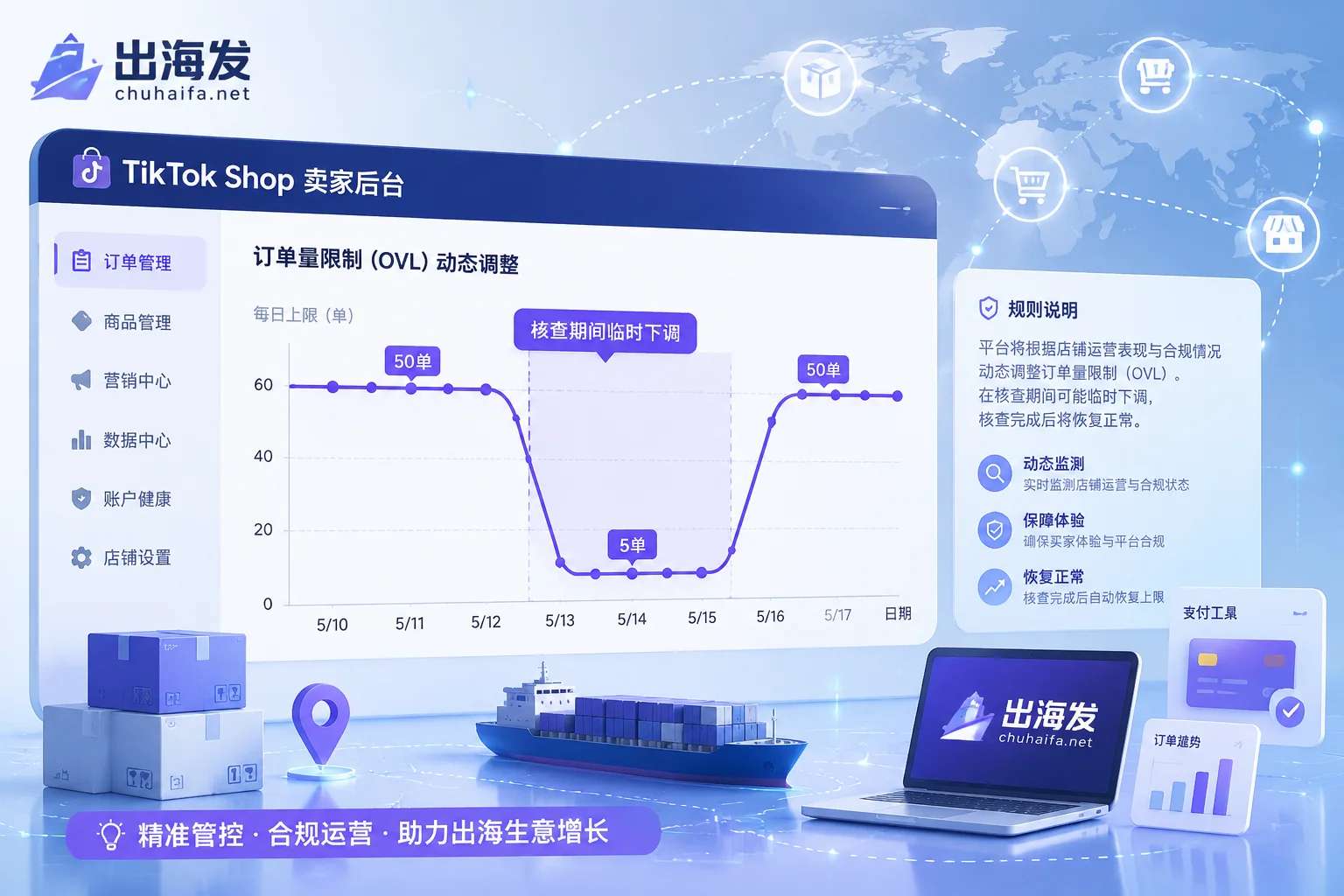
A sudden drop from a normal limit to 5 orders, with products showing as sold out, typically corresponds to a temporary reduction during routine safety and compliance reviews. The official rules state that the limit is restored after the review, but the duration is not specified.
Debunking Two Old Myths: “30 Days Auto-Pass” and “5-Order Cap Means Suspension”
Two long-standing myths in the community can now be put to rest.
Myth 1: You automatically graduate after 30 days or 500 orders. TikTok Shop has officially adopted a unified four-level auto-assessment mechanism in 2026. Manual requests for limit increases and whitelist channels have been abolished. Simply waiting or accumulating time won't trigger an upgrade unless you complete tasks and improve fulfillment metrics. Industry media reports also document the shift from the old single-metric probation to the staged task model.
Myth 2: Being capped at 5 orders means your store is banned. As explained above, OVL's dynamic fluctuations are the primary cause. As long as you haven't received a violation notice and your account status is normal, it's just a temporary cap during review. Believing “5 orders = banned” and turning to third-party services to force an increase is more likely to trigger secondary risk control.
Raising Your Limit Depends on Backend Metrics: What's Being Evaluated
Returning to the original question—when can you get a higher order limit? The answer lies in these backend metrics. Since it's not about days, what does the system actually look at? The official guidelines only list metric categories without specific thresholds, but the direction is clear:
| Metric Category | Specifics | Impact Direction |
|---|---|---|
| Fulfillment timeliness | Whether shipments are on time and within promised delivery windows | Key for limit increases |
| Merchant-caused cancellation rate | Percentage of orders canceled due to merchant reasons | Lower is better |
| Negative review rate | Percentage of negative reviews on products | Lower is better |
| Product compliance | Whether products infringe, are prohibited, or have complete information | Hard requirement |
| Task completion | Completion of periodic quiz tasks during probation | Prerequisite |
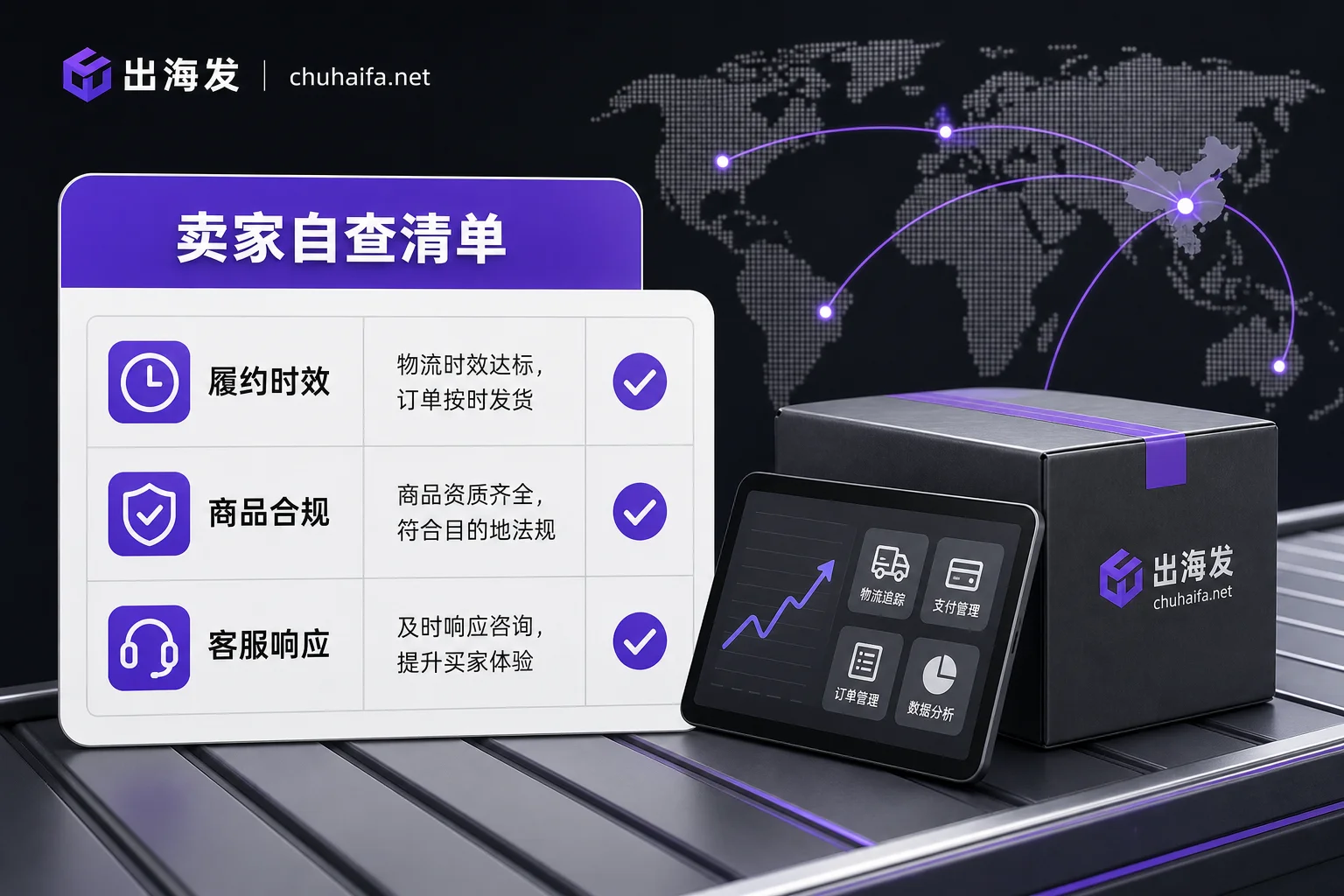
Once these metrics are stable, the system will automatically assess whether to upgrade you after you hit the current cap. But note: graduation isn't a permanent privilege. If you later commit serious violations or your fulfillment deteriorates, OVL can be compressed again, and your limit may be reduced. So, increasing your limit isn't a one-time achievement; it's a result of consistent operational health.
Three Store Types and Their Scaling Pace Differences
Depending on your store structure, the same level cap may pose different constraints. This is operational inference, for reference only:
- Light small-item scalability stores (many SKUs, scattered orders): Usually hit the product cap first. The 100-product limit at Beginner level may fill up in two weeks, but daily orders might not reach 50. These stores should prioritize pruning underperforming SKUs or focus on creating bestsellers.
- Single bestseller stores (concentrated orders): The order cap is the first constraint. A single hit product can reach 50 orders in a day, but the product count is far from the cap. Instead of adding products, optimize fulfillment and ratings to quickly reach the 100-order tier. Also, consider checking what to do when your creator outreach message limit runs out to plan your promotion pace.
- Multi-SKU long-tail stores (deep categories, many SKUs): For example, apparel stores often hit both product and order caps simultaneously. It's advisable to list in phases, first stabilizing core items, then gradually expanding.
Regardless of type, solid fulfillment metrics are key to upgrading, as they determine whether the system trusts you with larger volumes. If your daily shipping and customer service can't keep up, forcing volume will only increase negative reviews and cancellations, slowing down your limit increase pace.
Pre-Increase Self-Check List: Fulfillment, Product, and Customer Service
To determine when you can get a higher order limit, use the following three checklists. The tools for these areas (such as cross-border logistics, infringement queries, and customer service systems) are organized under the “Cross-border E-commerce Platforms” and “Overseas Enterprise Services” categories on the ChuhaiFa navigation site—you can search by category as needed, without specific product recommendations.
Fulfillment Timeliness Checklist
- [ ] Are orders shipped within the promised time?
- [ ] Do logistics providers pick up on time and meet transit time standards? For logistics channel and transit time selection ideas, refer to how to choose cross-border logistics tools
- [ ] Are there repeated instances of “logistics information not updating for a long time”?
- [ ] Are overdue orders proactively reported or communicated?
Product Compliance Checklist
- [ ] Do products involve brand infringement or prohibited categories? (You can use cross-border product selection tools for infringement checks)
- [ ] Are product titles, images, and descriptions consistent with the actual product?
- [ ] Do newly listed products pass platform review?
- [ ] If unsure, consult platform customer service for compliance requirements.
Customer Service Response Checklist
- [ ] Are inquiries responded to within the promised response time? (Official guidelines don't specify a special response time threshold for probation)
- [ ] Are negative reviews followed up on?
- [ ] Are return/refund disputes resolved promptly?
- [ ] Have you set up auto-replies and FAQs?
These checklists help you quickly identify potential weaknesses that might delay your limit increase. Additionally, if you're curious about how many product videos you can post daily and how to manage content frequency, see how many product videos can you post on TikTok Shop per day.
FAQ
How long does the TikTok Shop new store probation period take to pass?
The official guidelines don't specify a time frame. The only controllable factors are meeting fulfillment, negative review, cancellation, product compliance, and task requirements.
How do I lift the 50-order cap for my new TikTok Shop store?
Keep backend metrics healthy and complete pending tasks and quizzes. The system will automatically assess an upgrade; the official guidelines don't disclose the specific order or day conditions for triggering the upgrade.
What is the product count cap during TikTok Shop's probation period?
Beginner is 100, Standard is 200, Premium is 1000, and Pro (after graduation) has no cap. If you hit the product cap, you can only free up slots by delisting underperformers; level upgrades are system-automated, and manual applications have been abolished. Before delisting, check if the product is a main seller.
What does TikTok Shop OVL mean?
OVL stands for Order Volume Limit. It's independent of the probation period and adjusts dynamically each day. Once the cap is reached, products automatically show as sold out and reset the next day. During reviews, the cap may be temporarily lowered to 5 orders, which is normal.
After passing probation, can my order limit be reduced again?
Yes. If serious violations, a spike in merchant-caused cancellations, or a surge in negative reviews occur after graduation, OVL may be compressed and your limit could decrease. Therefore, you must consistently maintain good metrics to sustain scaling.
Can a new store pass probation just by being active for 30 days?
No. That's the old rule; the official has abolished the time-based system. Now you must complete the four-level tasks and maintain good metrics—the system auto-assesses, so waiting alone won't help.
Once you've located your level and completed the checklists, monitor your quota changes. For further assistance, refer to the logistics, infringement checks, and customer service tools in the corresponding categories on ChuhaiFa navigation.