

Open any ad monitoring tool (Ad Spy Tool), type in a category keyword, and thousands of videos and images immediately flood the screen. Many media buyers habitually sort by "likes" or "recent impressions" in descending order, pick a few eye-catching videos and send them to editors for imitation. As a result, they spend money on their own campaigns, get decent click-through rates, but conversions are a mess.
The problem lies in a basic fact: Whether it's the official transparency center or third-party monitoring platforms, no tool can access the real conversion rate and ROAS from a competitor's ad backend.
A large portion of the "active ads" you see in the tool are cannon fodder creatives that competitors just launched two days ago and are losing money testing; others are purely "buzz posts" that attract massive invalid interactions because of bizarre visuals. To filter out the "true winners" that actually make money for competitors from the massive creative library, you can't just look at surface interactions. You must cross-check the following 3 hard signals built on real money.
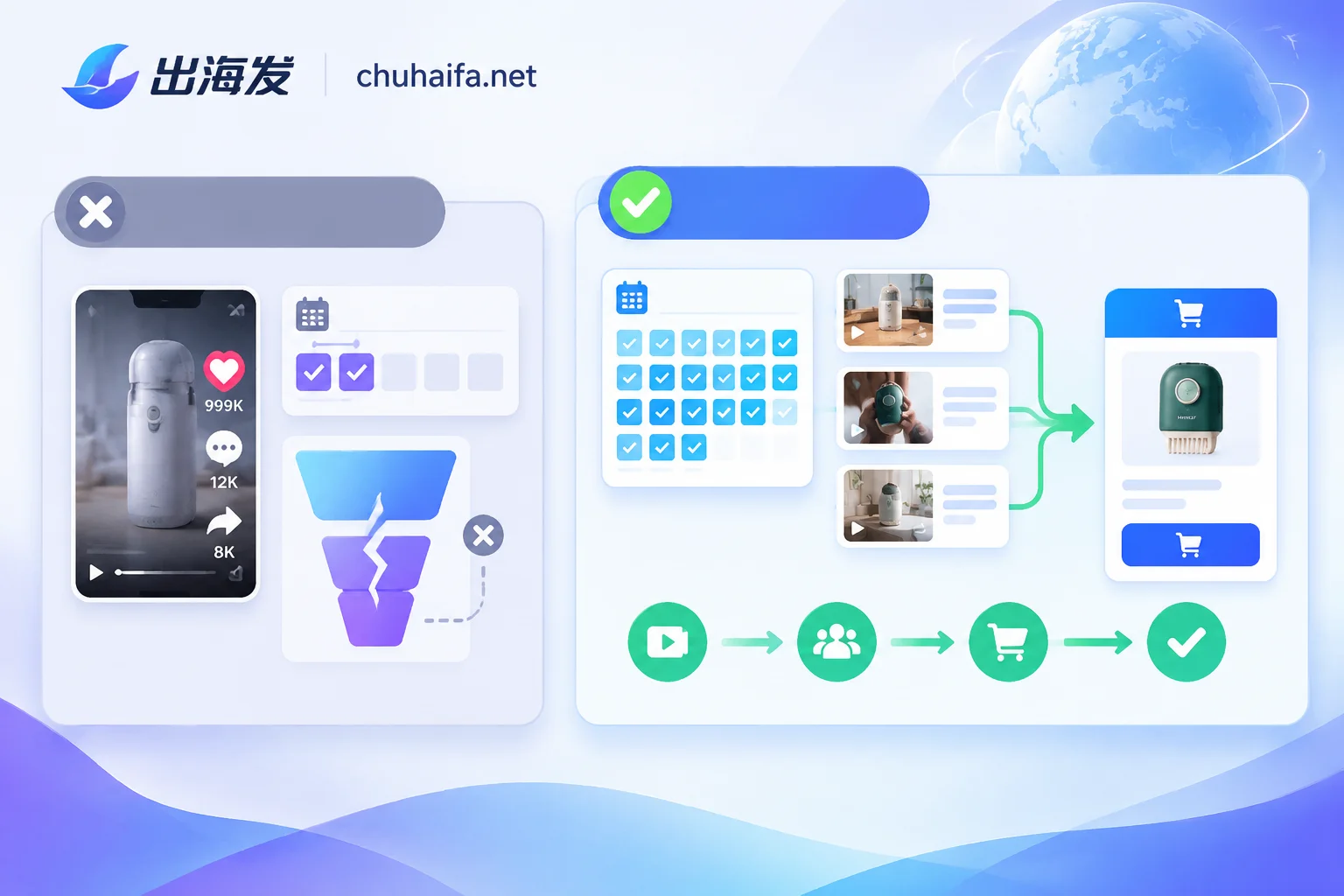
Signal 1: Check the number of days the ad has been running; let the competitor's budget verify for you
In the media buying market, there is an extremely practical default rule: No one will continuously spend their own money for half a month on a losing ad.
Likes and comments can accumulate through hot posts, and may even skyrocket due to controversial topics, but "continuous online budget consumption" cannot be faked. Therefore, run length (days running) is the closest proxy for true profitability across all ad monitoring tools.
When filtering in practice, you can divide run days into three tiers:
- 1-3 days (testing phase): The vast majority are test creatives automatically distributed by machines. Unless you want to track a new product launch from a top competitor today, don't use creatives from this phase as templates for rewriting scripts.
- 7-14 days (volume validation phase): This indicates the creative has survived the cold start phase, front-end costs are controllable, and the optimizer has decided to keep it and continue observing. For fast-moving consumer goods or impulse products with short lifecycles, running for two full weeks is already a qualified reference.
- 20-30 days or more (stable profit phase): A commercial ad that can run continuously for a month without being shut down must be backed by stable positive cash flow.
Here's a detail to watch out for: some brands, in order to maintain page activity, will run an engagement ad spending only $2 per day for over half a year. To eliminate such "zombie long-lived posts," when using a third-party ad tool for filtering, don't just check "run duration > 15 days"; also add the condition "still has new impressions/interactions in the last 7 days" to ensure it's a live ad still aggressively spending budget.
Signal 2: Look at the number of same-source variations to catch the direction optimizers are scaling
When a media buyer finds a video with high ROAS, what's their first reaction?
Absolutely not to rest on their laurels and wait for the creative to naturally decline, but to immediately have the editing team break down the video: keep the core pain points and conversion logic, change the first 3-second visual hook, change the voiceover, change the background music, change the aspect ratio, and then create a dozen more ad sets at once to grab more traffic.
This action leaves very obvious traces in ad monitoring tools—Active Variations.
If you search for a competitor and find that under their name there's a beautifully shot video but it's the only one running, and it stopped after five days, that's likely a failed attempt. Conversely, if you see in the Facebook official ad library or a monitoring tool that the same advertiser has densely launched 5 to 15 videos in the last two weeks that are "identical in the middle product demo, only different in the first 3 seconds," or the same set of videos paired with four or five different copy angles and calls-to-action (CTAs), that's the strongest signal of main scaling.
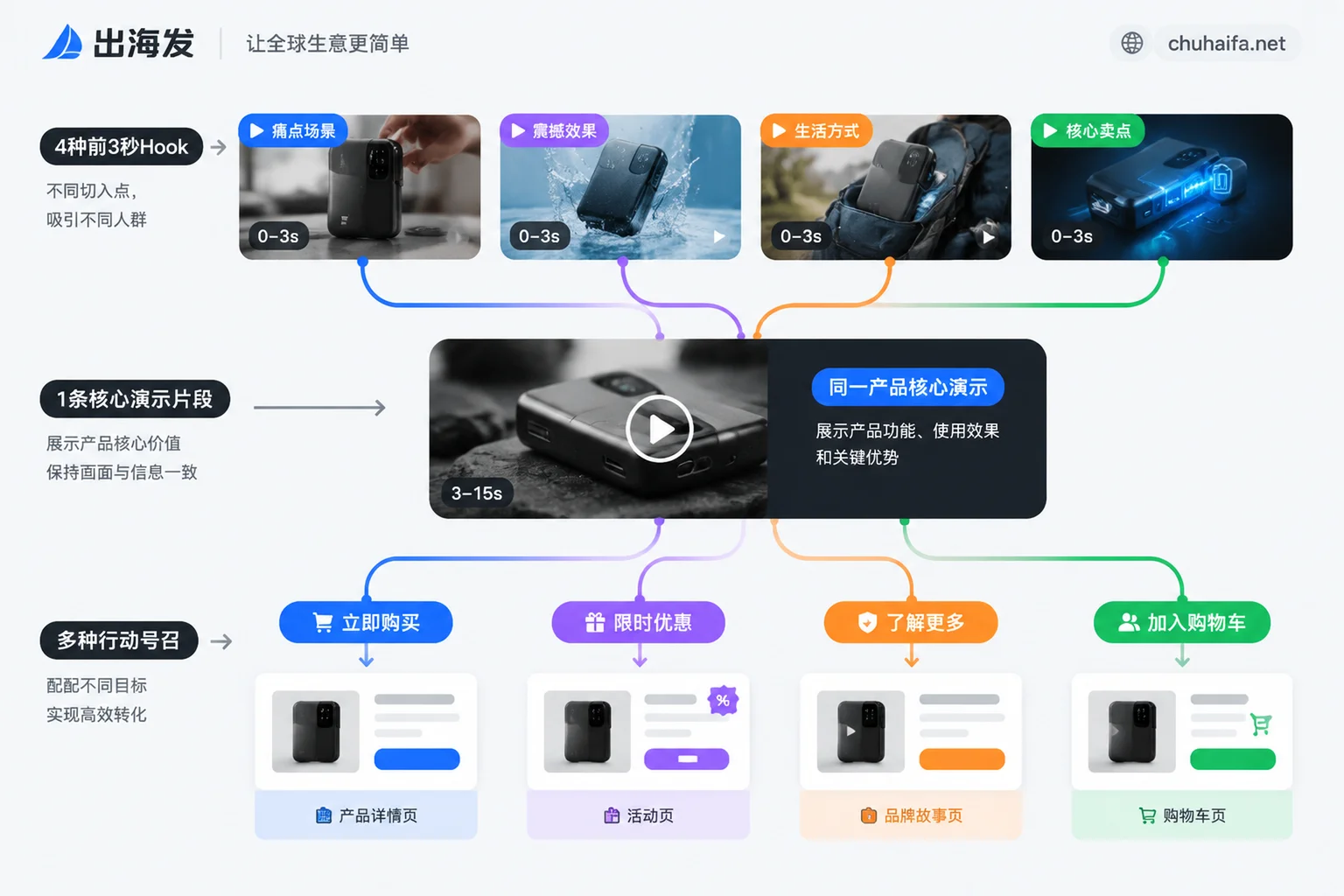
Studying such variation clusters not only helps you lock onto true winners but also directly saves half the script breakdown work:
- Look at what they don't change: The part of the video or lines that remain unchanged across multiple variations are the core selling points that have been proven to drive purchases.
- Look at what they do change: Comparing the openings of different variations reveals at a glance which target audience pain points the competitor is testing.
Once you've organized these highly validated opening hooks and pain points, and then use multilingual generation solutions to batch rewrite, the probability of your final videos performing well will be much higher. For how to efficiently produce after getting reference directions, you can follow the steps in How to Combine AI Tools for Multilingual E-commerce Creatives: Choose a Route Based on Your Existing Materials. However, note that even when leveraging your own viral structure for fission, you must thoroughly deduplicate the underlying audio and video. The reason is detailed in Will Re-posting the Same Creative with a Different Cover Be Flagged as Duplicate? Yes, the Platform Compares the Audio-Video Itself, Not the Cover.
Signal 3: Follow the external link to the landing page to verify if the conversion funnel actually works
Many beginners use ad monitoring tools but only stay on the video player box, download the creative, and close the page. This misses the most crucial part that can help you avoid pitfalls—follow the landing page URL on the ad card to see how the competitor captures this traffic.
Half the credit for a creative's success goes to the landing page's ability to receive the traffic. If you only copy someone's eye-catching front-end video but direct users to your own unconvincing generic product detail page, the conversion rate will still plummet.
After clicking on the landing page snapshot or real link provided by the monitoring tool, focus on verifying three things:
- Consistency between visuals and promises: If the first 3 seconds of the video highlight "buy one get one free" or solving a specific pain point, does the first screen of the landing page immediately use the same image and bold headline to uphold that promise?
- Choice of page type: Does the competitor not directly jump to a regular product detail page, but instead create a long-form advertorial, a comparison table page, or a standalone lander with a countdown and bundle tiered pricing? If similar viral ads all use advertorials as a buffer, it means cold traffic for this category is hard to convert by pushing the product page directly.
- Tracking parameters and stock status in the link: Observing the UTM parameter naming at the end of the URL can sometimes directly reveal the competitor's campaign structure (e.g., distinguishing cold audiences from remarketing audiences). If you click through and find the product shows Sold Out or the page is a 404, yet the ad is still running, that's just the competitor forgetting to turn off the ad—don't jump into the fire pit with them.
If you're still unclear about which channels different levels of monitoring platforms are good at capturing data from, you can first read this article What Platforms' Creatives Can Ad Monitoring Tools See: Divided into Four Layers by Tool Type to get a clear understanding of the tools.
How to string these 3 signals into a daily creative screening process
You don't need to spend hours scrolling in tools every day to find creatives. Follow this fixed routine, and spend half an hour each week to filter out a high-certainty reference list:
| Step | Actions in the tool | Elimination criteria (skip directly) | Advancement criteria (focus on breakdown) |
|---|---|---|---|
| 1. Initial screening for survival | Set run days ≥ 14, and active impressions in the last 7 days | Running less than 5 days, or no new spend in the past week | Continuously running for over 2 weeks, recent impression curve stable or rising |
| 2. Check variation clusters | Click into the advertiser's homepage and view all creatives running in the same period | A single lonely ad, no similar test versions before or after | The same selling point spawns 3 or more variations with different openings/voiceovers |
| 3. Penetrate to see the landing page | Click the CTA button or target landing page link attached to the ad | Landing page won't open, product mismatch, perfunctory generic product page | First screen's pain points perfectly match the video, with clear promotional tiers or trust endorsements |
When doing this whole set of competitor research, landing page breakdown, and subsequent conversion tracking, it's often necessary to use multiple tools together:
- Find intelligence and test pages: Under the Overseas Advertising Tools category, commonly used third-party tools are grouped into three directions: "Ad Monitoring (Creative Intelligence)," "Tracking Systems," and "Testing & Optimization (speed testing, heatmaps, landing page A/B testing)." Click on an entry to go directly to the official website.
- Cross-check with official transparency libraries: For deep investigation of a single brand, you can use third-party tools together with official free libraries. Common official portals and plugins are organized in Facebook Tool Navigation (including official materials and ad library portals) and Google Tool Navigation.
- Follow up on landing pages and creative production: After identifying a competitor's high-converting page structure, if you need to find lander building tools, copywriting tools, creative editing or video downloading tools to quickly build your own test version, you can go directly to the Content Production channel and choose as needed.
Tools only provide public data and surface signals. Developing the habit of "checking duration to verify authenticity, checking variations to grasp key points, and checking landing pages to complete the loop" is what truly turns ad monitoring tools into your money-saving radar, rather than leading you into the quagmire of blind trend-following tests.