

When running Meta ads, it is recommended to use both Meta Pixel and Conversions API (CAPI for short). Meta officially calls this a redundant setup: the browser and the server each send an event, so if one side misses something, the other can fill the gap. However, before enabling both, you must first set up event deduplication. Without deduplication, the same order will be counted as two conversions, inflating the data, and the ad system will bid and learn based on the wrong signals.
The following sections cover: why you need both, how to configure deduplication, how to implement it for different site-building methods, and what to check after launch.
What Each Handles and Why It Is Not an Either-Or Choice
Pixel runs in the user's browser. It is good at recording real-time behaviors on the page, such as viewing, adding to cart, and initiating checkout. It can also read and write browser cookies, such as _fbp (browser identifier) and _fbc (ad click identifier). These identifiers are important clues for Meta to match an event to a specific user.
Pixel's weakness also comes from the browser. Ad blockers, Safari's ITP, iOS tracking protection, network interruptions, or users closing the page before it finishes loading can all prevent Pixel events from being sent.
CAPI sends events directly from your server to Meta, bypassing the user's browser, so it is largely unaffected by these blocks and interruptions. It can also include customer information known to the server (such as hashed email, phone number, or external user ID), which helps improve Event Match Quality (EMQ). But the server cannot see real-time behavioral details in the browser; _fbp and _fbc also need to be read on the frontend first and then passed to the server.
So the two are complementary: Pixel provides browser-side behavior and device identifiers, while CAPI recovers signals lost in the browser. Using only Pixel makes it easy to miss orders; using only CAPI, you lose some user matching clues.
Are there cases where you can temporarily use only Pixel? Yes. If you are not yet able to do deduplication properly, for example, if no one can modify the backend of a custom site right away, then running only Pixel is safer than enabling both without deduplication. Missing some events will make the data lower than actual; duplicate counting will directly exaggerate conversions and mislead ad optimization. Add CAPI once conditions allow.
Prerequisite for Using Both: Event Deduplication
Meta relies on two parameters to determine whether events sent by Pixel and CAPI are the same:
- Event name
event_namemust be exactly the same. If Pixel sendsPurchase, CAPI must also sendPurchase. You cannot writePurchaseon one side andpurchaseorOrderon the other. - Event ID
event_idmust be exactly the same. For the same user action, the frontend and backend must use the same unique ID.external_idcan serve as an auxiliary.
Within a certain time window, if Meta receives a Pixel event and a CAPI event with both parameters identical, it will merge them into one and retain data from both sides. If even one parameter does not match, they will be treated as two separate events.
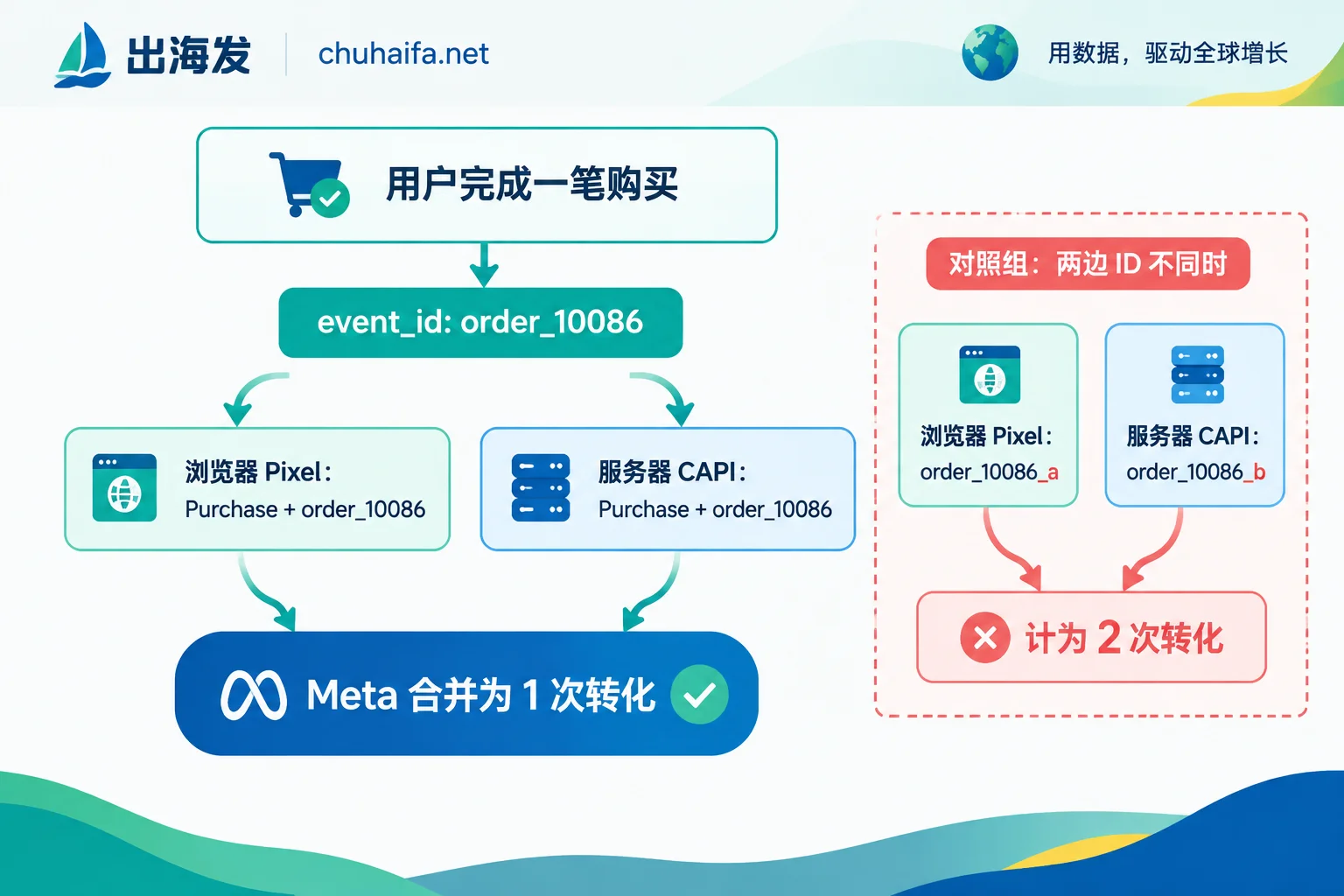
The method used to generate event_id is not the key point; the key is that the same value must be passed to both the frontend and the backend. A common approach: when the action occurs, the business system generates an ID once (for purchase events, you can use the order number directly or generate a UUID), writes it into the page or data layer, and both the frontend Pixel and backend CAPI read from there.
In the Pixel code, the event ID is written in the fourth parameter, with the field name eventID:
fbq('track', 'Purchase', {value: 59.9, currency: 'USD'}, {eventID: 'order_10086'});The corresponding field in the CAPI request is called event_id, and its value must be the same as the frontend, for example, event_name is Purchase, and event_id is order_10086.
Several common mistakes:
- The frontend and backend each generate a random ID. On the surface, both have an
event_id, but in reality they never match. - The user refreshes or returns to the thank-you page, and Pixel sends the purchase event again with a new ID.
- The event name differs in case or spelling.
Choose an Implementation Path Based on Your Site-Building Method
Using mainstream e-commerce systems such as Shopify or WooCommerce: Prefer the official Meta partner integration in the official app or plugin. Such solutions generally already include both Pixel and CAPI sending and automatically match event_id for deduplication. You mainly need to do three things: connect the account, confirm that events are enabled, and verify the data. Be careful not to manually add another Pixel code snippet outside the official integration or install another CAPI plugin; these extra events do not have a unified event_id and will cause duplicate counting.
Using Google Tag Manager server-side container (sGTM): The Pixel tag in the web container and the CAPI tag in the server container must read the same event_id. The usual approach is to include event_id when pushing the event to the Data Layer, and both tags reference this variable instead of generating their own.
Custom sites or headless architectures connecting directly to CAPI: You need to generate a unique event_id in the business code and send it to both the frontend Pixel call and the backend CAPI request. Whether you use an order number, UUID, or a timestamp combination depends on what is convenient for your system. There is only one principle: one action corresponds to one ID, shared by frontend and backend.
What to Check After Launch
- In Meta Events Manager, view the same event and confirm that it comes from both browser and server sources. If you only see one source, the other side is not connected.
- Check the Event Match Quality (EMQ) score and whether there are warnings about duplicate events or missing
event_id. - Place a test order, then compare the purchase count in the ads dashboard with the actual order count in your store backend. If the ads dashboard purchase count is nearly double the actual orders, it is safe to conclude that deduplication is not working. Go back and check whether
event_nameandevent_idmatch.
Browser privacy restrictions and Meta's own data policies are still changing, and the role of server-side signal supplementation may become increasingly important. For the impact of Meta's off-site data policy adjustments, you can refer to What Meta's removal of the off-site data opt-out option affects.
Where to Choose Tools Next
First figure out which site-building method your site uses, then find the corresponding tools:
- If you are still choosing a site-building system, or want to switch to an e-commerce platform with built-in official Meta integration, you can compare options in the Cross-border E-commerce category.
- If you need tools such as ad management or tracking attribution, you can choose from the Advertising Tools category.
For which CAPI features each provider supports and how they charge, refer to their official website descriptions.