

Here's the conclusion up front so you can map it directly to your situation:
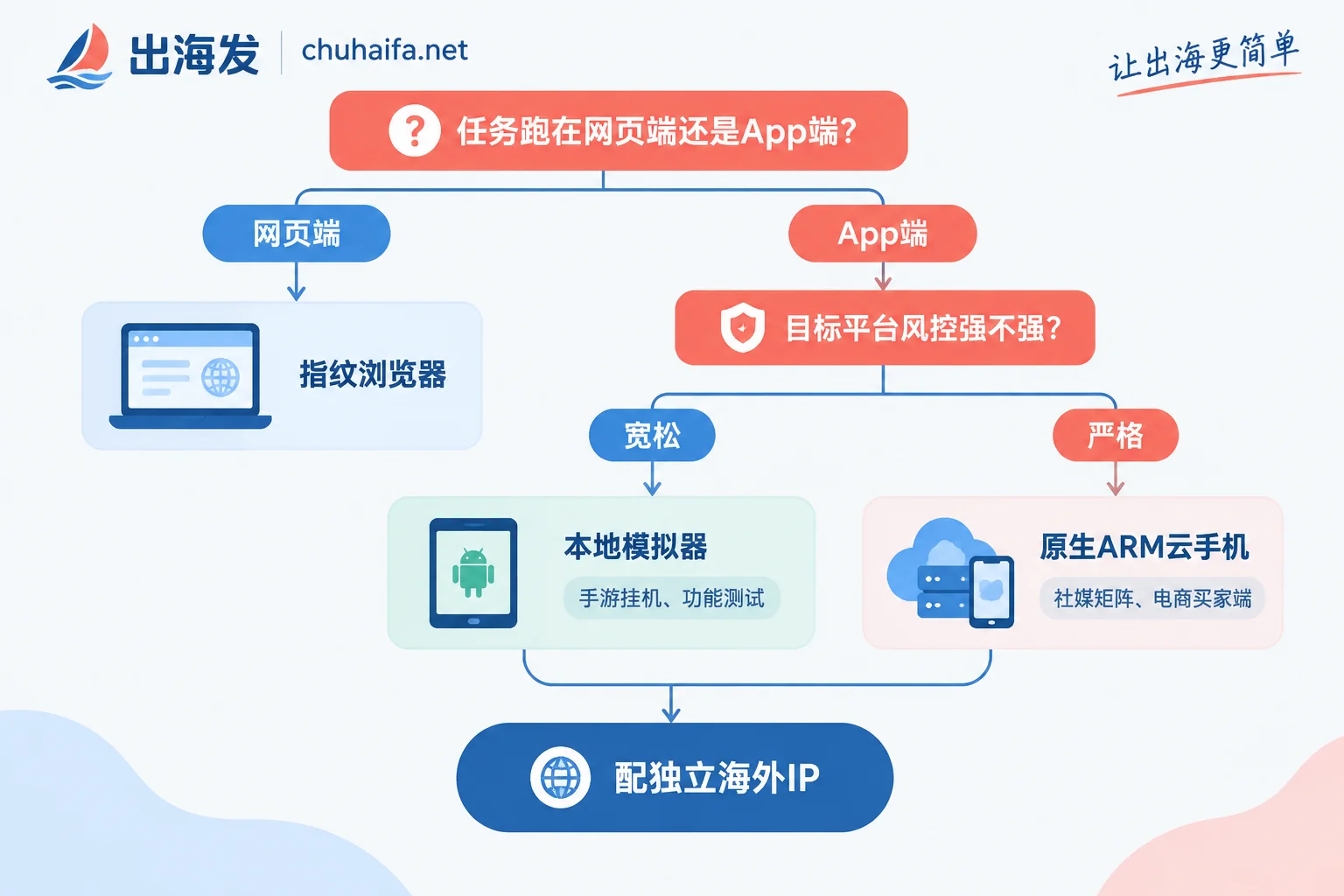
- If your target app is a mobile-first platform with strict risk controls like TikTok, Instagram, WhatsApp, Telegram, or LINE, or you need 24/7 unattended operation and remote team collaboration—choose a cloud phone, and specifically one that runs on native ARM architecture or real device boards in the cloud.
- If your goal is low-risk game farming with unattended operation, app functionality testing, or low-risk tool accounts, you operate from a PC, and you only need a dozen or so instances—a local emulator is more cost-effective.
- If your business already runs on the web (e-commerce backends, ad platforms, web-based social media), you don't need to decide between these two; an antidetect browser is the right layer.
Below, I'll explain why this split makes sense and how to choose within each category.
This Isn't a Performance Contest—It's About Two Types of Device Identity
Many people think the difference between cloud phones and emulators is just "running in the cloud" vs "running locally," but the real difference is one layer deeper.
Local emulators (like LDPlayer, MuMu, BlueStacks) run on a PC's x86 architecture. Android apps are originally compiled for ARM, so a translation layer is needed. This translation, combined with virtualization itself, leaves behind VM characteristics like QEMU. Also, emulators lack real phone hardware sensors such as gyroscopes, accelerometers, and basebands—they can only provide fake or null values. Major overseas apps and Play Integrity checks focus on exactly these points. Once flagged as a virtual machine, you might face limited functionality or even a ban.
Cloud phones, on the other hand, are typically deployed on ARM servers or real device boards in cloud data centers. Their system environment and instruction set match real phones, so device characteristics are inherently more credible. This is the fundamental divide—not speed, but whether this "phone" looks real to the platform.
Four Differences That Directly Change Your Decision
Who bears the concurrency limit. Emulator multi-instancing puts all computation, graphics rendering, and memory on your local PC. A high-end rig typically runs 10 to 20 instances stably; beyond that, you get lag and crashes. Cloud phones put the compute power in a cloud cluster, and your local machine only handles video streaming and commands. A regular laptop or even a phone can control dozens or hundreds of instances simultaneously. So if your matrix is bound to grow, emulators have a hard ceiling.
Whether IPs are truly separated. You can run proxies in each emulator instance, but all traffic ultimately goes through the host machine's physical network card and routing stack. If a proxy disconnects, the real exit IP is exposed. Plus, multiple instances sharing the same host hardware fingerprint can easily get accounts linked together by the platform—one issue leads to mass bans. Reliable overseas cloud phones implement sandbox isolation at the device level and bind independent overseas residential or data center IPs directly at the network driver layer, achieving one device, one IP, one environment. This often matters far more for multi-account matrices than performance.
Whether it can run unattended. Emulators require the local PC to be on 24/7 without sleep. Power outages, network drops, or system updates and restarts will interrupt all tasks. Team collaboration across cities requires an additional remote desktop layer. Cloud phones run in data centers, natively supporting 24/7 unattended operation and background tasks. Most services also offer team features like account permissions, bulk app installation, and synchronized group control. Whether your operation is "manual-heavy" or "long-term unattended" basically determines which side to choose.
Whether costs are one-time or ongoing. Emulator software is mostly free, but you need to buy a high-end PC first, then bear ongoing hardware depreciation, electricity, and maintenance labor. Cloud phones are subscription-based per device per month, with clear marginal costs—though at scale, the total isn't low. They also consume local downstream bandwidth; insufficient bandwidth leads to noticeable latency. Don't just compare software prices. Factor in PC depreciation and the cost of re-registering banned accounts to get a fair comparison.
How to Decide by Scenario
Game farming, resource grinding: Emulator. These games usually have loose risk controls, low demands on device authenticity, low local control latency, and mature macro and multi-instance sync. Spending on a good PC is more suitable than a long-term subscription.
App functionality testing, internal tool accounts: Emulator. Testing only needs to pass the workflow; it doesn't involve account nurturing or long-term retention, so no need for cloud.
Social media matrices for TikTok / WhatsApp / Telegram / LINE: Cloud phone, and confirm it's a cloud-native ARM or real device solution, not an emulator moved to a cloud server (some cheap "cloud phones" are essentially cloud hosts running emulators—none of the fingerprint issues are solved). These platforms are sensitive to device authenticity, IP geolocation, and behavioral continuity. The money saved on the device layer usually comes back as bans.
Cross-border e-commerce buyer account management, app-based store operations: Cloud phone. Buyer accounts need long-term survival and stable regional profiles—same needs as social media matrices.
Web-based e-commerce backends, ad accounts, web social media: Neither—use an antidetect browser. It handles browser-level fingerprint isolation, which is much lighter and more appropriate than spinning up a bunch of Android environments for web tasks.
There's also a common combo: main accounts on cloud phones for nurturing, bulk low-value test accounts on emulators, and web backend operations via antidetect browser. No need to pick just one.
Four Key Things to Check When Choosing a Cloud Phone
- Is the architecture truly ARM? Ask directly whether it's ARM servers, real device boards, or a virtualization solution on x86. This determines whether the aforementioned fingerprint credibility holds.
- How are IPs bound? Does the provider supply data center IPs, or can you bring your own residential proxies and bind them at the system level? Social media matrices generally need residential IPs that can be fixed long-term; data center IPs are better for tasks insensitive to geolocation.
- Billing and concurrency granularity. Per device per month or per hour? Can you stop/start individual devices? Can you scale up or down anytime? Matrix size changes; inflexible billing makes cost control hard.
- Team features. Permission management, bulk app distribution, synchronized group control—these save significant time when a few people work on accounts together.
For specific features and pricing, refer to each provider's official website. Different plans from the same provider vary widely. Before choosing, confirm each of the four points above.
If You Decide on Emulators, Keep Risks Controllable
Limit instances per machine; don't push for maximum count. Assign independent proxies to each instance and set up auto-pause on disconnection to avoid exposure when proxies drop. Don't share login states and caches between accounts. Most importantly, don't use them for accounts you can't afford to lose. Emulators aren't unusable—just use them in the right place.
After Deciding, What to Configure Next
Once the device layer is set, two more things follow.
First, networking. Whether cloud phone or emulator, IP is the other half of account survival. Figure out whether your tasks need residential or data center IPs, and whether you need long-session fixed exits, then choose a provider. For guidance, see What Tasks Are Residential Proxies and Data Center Proxies Suitable For?. When selecting specific services, compare by type in the Overseas Network Category.
Second, numbers for registration. Mobile social media accounts almost always require phone verification. The number type and country must match your device's IP geolocation; otherwise, even the cleanest device will fail at the first step. For number selection, see How to Choose Numbers by Country and Platform on Overseas SMS Reception Platforms. The service entry is in the Overseas SMS Reception Category.
If you determine your business is mainly web-based, go directly to the Antidetect Browser Category to choose. First check Is a Free Antidetect Browser Enough for E-commerce Multi-Accounting? before deciding whether to pay for a premium version.
A final reminder: the above categorization is based on the premise of "target platform risk control strength," and detection strategies change over time. Before scaling up, run a small batch of accounts for two to three weeks to observe survival rates—that's more accurate than any comparison article.