

Facebook marketing tools can be roughly divided into seven categories: official management and ad suite, content scheduling and publishing tools, ad automation tools, competitor ad intelligence tools, Messenger private domain automation tools, creative and AI design tools, and account environment isolation tools.
Among these, only the official suite is the foundation that everyone will use. The other categories depend on what you are doing: focusing on organic traffic, already running paid ads, or driving ad traffic to direct messages for conversion. Add each category as your business reaches that stage.
First, determine how many categories you need based on your business stage
- Running one or two Pages, mainly posting and replying: Meta Business Suite plus one design tool is usually enough.
- Starting paid advertising: Use Ads Manager to build ads and Meta Ad Library to research competitors. When you have too many ad sets to monitor manually, consider ad automation tools.
- Driving ad traffic to Messenger for leads and inquiries: Add a chatbot tool.
- Multiple Pages, multiple platforms, team collaboration for content: Add a scheduling and publishing tool.
- Operating multiple ad accounts simultaneously, or managing for multiple clients: Consider account environment isolation.
It is recommended to start with official tools. When a certain step clearly starts consuming manpower, then introduce the corresponding third-party tool. Third-party tools and the official backend have many overlapping features. If you equip everything from the start, you often pay for features you won't use.
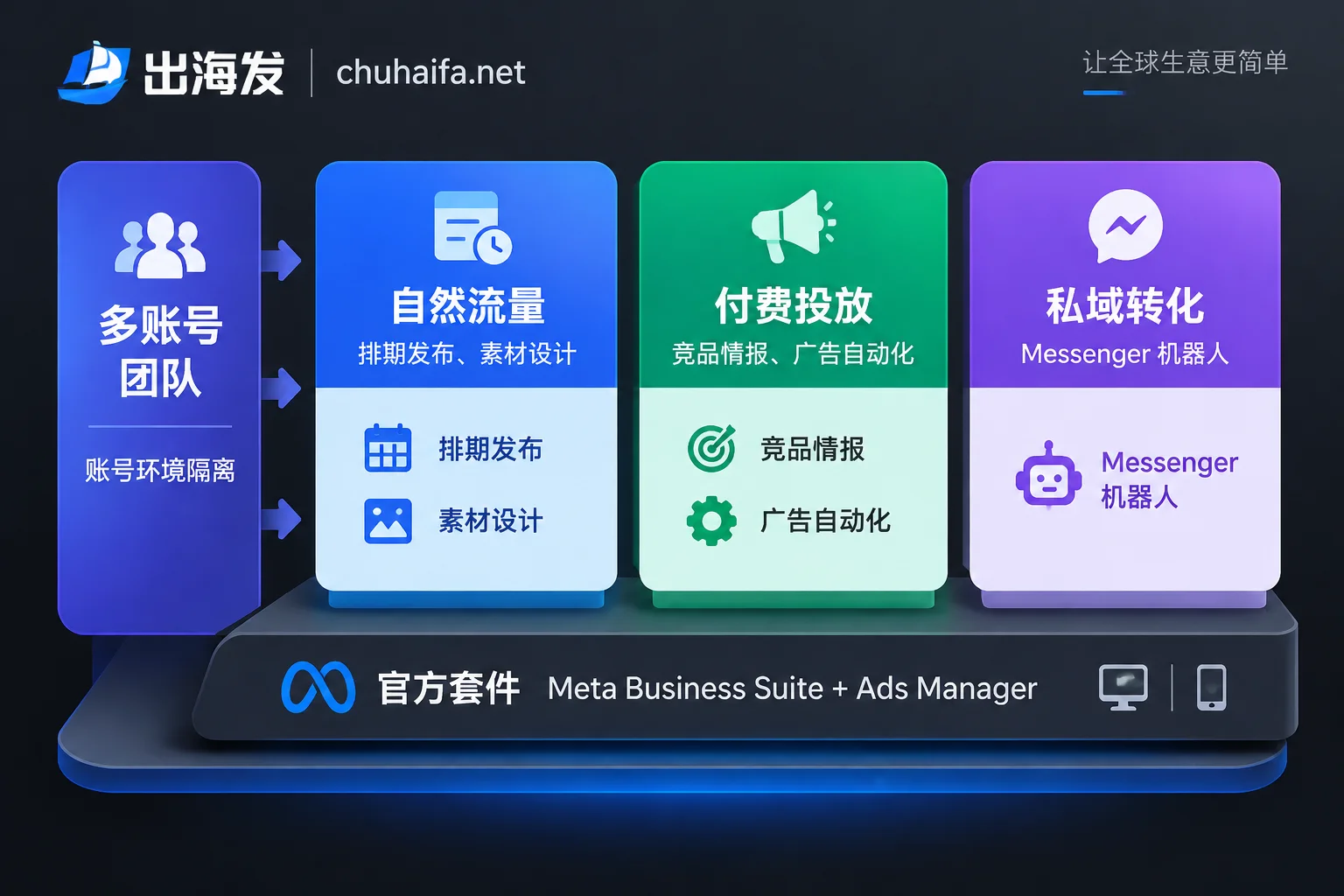
What each of the seven tool categories solves
1. Official management and ad suite: the foundation for everyone
Meta officially provides two core tools:
- Meta Business Suite: Manage Pages, schedule posts on Facebook and Instagram, handle messages and comments in a unified inbox, and view audience and content performance.
- Meta Ads Manager: Build ads at the campaign, ad set, and ad levels, responsible for audience targeting, conversion tracking and attribution, and A/B testing.
These two tools are free; ad spend is separate. Most of the third-party advertising and automation tools mentioned later work on top of Ads Manager data. Therefore, conversion data must first be accurate at the official level before discussing third-party optimization. For details, refer to Should Pixel and CAPI be used together and How to set ad attribution windows.
2. Content scheduling and publishing tools: save manpower with multiple Pages and platforms
Representative tools include Buffer, Hootsuite, SocialPilot, and Agorapulse. They are mainly used to:
- Plan content calendars and schedule bulk posts;
- Centralize comments and messages from multiple Pages and platforms for replies;
- Monitor brand mentions and sentiment.
When needed: If you only do Facebook and Instagram, Business Suite's scheduling is basically sufficient. The value of third-party tools emerges when you need to manage more platforms simultaneously, require multi-person approval workflows, or want sentiment monitoring.
How to choose: First confirm three points: which platforms are supported, how many accounts can be connected, and how team permissions are divided. These vary greatly among providers; refer to their official documentation.
3. Ad automation and optimization tools: solve manual monitoring
Representative tools include Madgicx, AdEspresso, and Revealbot. Their core capability is automatically handling ads based on preset rules. For example, automatically increase budget when ROAS hits target, decrease when below threshold, or pause underperforming creatives. Some tools also support bulk generation of ad variations and deeper attribution analysis.
When needed: When you have many ad sets, or run ads across time zones and cannot monitor in real time, automation can reduce budget waste. If you only run a few ad sets, manual adjustments are usually enough.
Note: Automated rules rely entirely on postback data. If the ad backend's ROAS does not match actual store orders, automated rules will amplify the discrepancy. Before implementing automation, first check data consistency according to What to do when ROAS doesn't match backend orders.
4. Competitor intelligence and ad spy tools: find creatives and product ideas
- Meta Ad Library: Official free tool to publicly view active ads.
- Third-party ad intelligence platforms: such as AdSpy, BigSpy, etc.
These tools are used to observe what creative styles competitors use, what pain points their copy addresses, how long they have been running, and what their landing pages look like, providing reference for product selection and creatives.
How to use: Start with Ad Library, viewing competitor Pages one by one. When you need to filter across many advertisers in bulk and track long-term, consider paid third-party platforms. Use the content as reference for ideas, do not directly copy creatives.
5. Messenger private domain automation tools: turn ad traffic into conversations
Representative tools include Manychat, Chatfuel, and REVE Chat. They specialize in automated interactions on Messenger and in comments. Common uses include:
- Users open a conversation directly after clicking an ad (Click-to-Messenger);
- Automatically send a direct message after a user comments on a post;
- Automatically collect leads and perform initial qualification.
When needed: Businesses that require communication before closing, such as B2B inquiries and high-ticket products, are best suited for this category. If leads also need to sync to CRM or spreadsheets, first confirm whether the tool can integrate with your existing systems. As lead sources increase, you will also face duplicate customer counting; refer to How to deduplicate cross-border private domain customers.
6. Creative design and AI tools: increase testing frequency
Representative tools include Canva, Lately AI, etc. Facebook Feed, Reels, Stories, and carousel ads each have different size requirements. These tools provide ready-made templates for images and videos, can rewrite copy, or distill long content into short posts. Their value lies in producing multiple versions faster, allowing ad testing to run more frequently.
For specific size and format requirements per placement, refer to Meta's official Ads Guide. Check against it when choosing templates.
7. Account environment isolation tools: infrastructure for multi-account teams
Facebook has strict risk control for logging into multiple business Pages or ad accounts from the same device or IP. Teams operating multiple accounts or account matrices typically use fingerprint browsers + independent static residential IPs to run each account in a relatively independent environment, reducing the risk of accounts being associated and banned together.
There are several prerequisites for this category:
- If you only operate one Page and one ad account, you generally do not need these tools.
- It is best to use a fixed environment for each account, do not frequently switch IPs and devices.
- Environment isolation can only reduce association risk. If ad content or account behavior violates Meta policies, it will still be restricted; it cannot replace compliance itself.
Common pitfalls when choosing tools
- Feature overlap: Scheduling tools overlap with Business Suite, and automation tools overlap with Ads Manager. First clarify where official tools fall short, then decide what to buy.
- Authorization method: When third-party tools connect to accounts, prefer login via Meta's official authorization. Try not to hand over account passwords directly.
- Data discrepancies: It is common for third-party tool reports to not match the official backend. The team should agree in advance which source to trust.
Next step: choose based on the missing category
Based on the stage assessment above, identify which category you lack, then compare within that category:
- Ad automation, competitor ad intelligence tools: Ad Tools
- Content scheduling, social media operations and private domain interaction tools: Overseas Promotion
- Multi-account environment isolation: Fingerprint Browsers
For specific features and pricing of each tool, refer to their official websites.